Settings Reference
All settings are managed through the Settings panel in the Synapse UI. You can reach it from the left sidebar at any time. Settings are stored in DATA_DIR/settings.json and merged with defaults on startup — you only need to include fields you want to override.
General
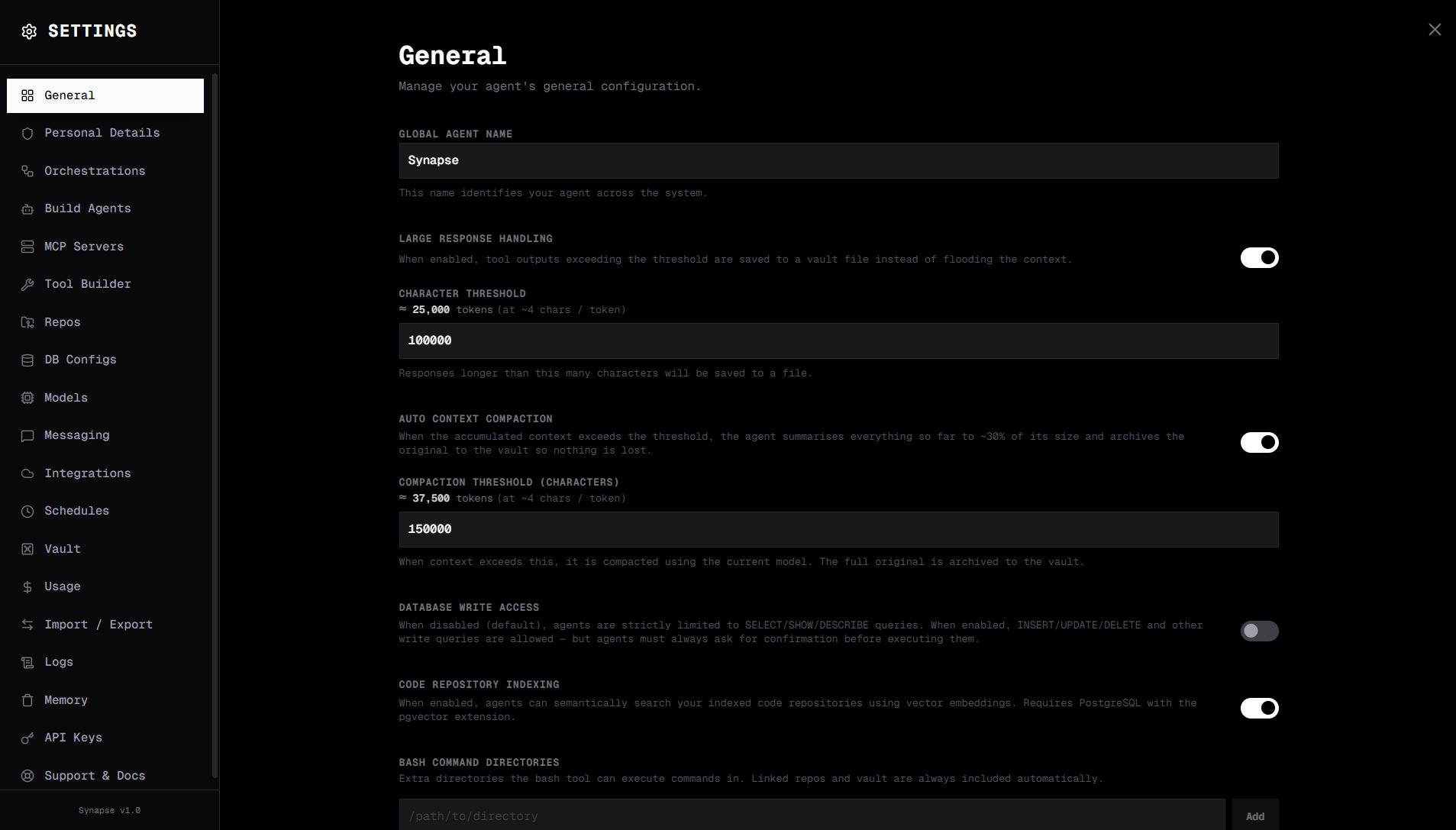
The General tab controls core behaviour for your Synapse instance.
Global Agent Name sets the display name shown in the UI header and used when the agent introduces itself. Defaults to "Synapse".
Large Response Handling controls how Synapse deals with very long agent responses. Toggle it on to enable automatic summarisation once a conversation reaches the character threshold you set. The field shows a token estimate alongside the character count so you can calibrate it against your model's context window.
Caching is on by default — Synapse caches stable prompt prefixes at the provider level and memoizes deterministic tool calls, typically cutting LLM cost by 50–80% on repeated work. See Caching for the full breakdown of prompt, response, and tool caches, and where to view savings in Settings → Usage.
Auto Context Compaction automatically reduces context size when a conversation grows past the configured threshold (auto_compact_threshold, in characters). Compaction runs in two stages:
- Cheap trim — Synapse drops the oldest tool-call outputs from the history without making an LLM call. If this recovers at least 20% of context, it stops here.
- LLM summarise — If trimming alone is insufficient, Synapse sends the full history to the LLM and compresses it to approximately 30% of its original size. The pre-compaction history is archived to the vault so it remains accessible if you need to review it.
Enable it in the General tab and set the character threshold that triggers the first compaction. Useful for long-running research or coding sessions where context would otherwise overflow the model's window.
Database Write Access is off by default. When disabled, the SQL tool only permits SELECT, SHOW, and DESCRIBE queries. Enable this only for agents that need to write data.
Code Repository Indexing enables semantic code search. Toggling it on reveals a PostgreSQL connection form — fill in Host, Port, Username, Password, and Database Name. Synapse uses pgvector to store embeddings of your indexed code files. You also need at least one repo configured under Settings → Repos.
Bash Command Directories is a list of filesystem paths the bash tool is allowed to operate in. Add directories with the + button and remove them with the trash icon. The vault and any configured repo paths are always permitted regardless of this list.
Transform Step Runtime controls how Transform steps in orchestrations execute their Python code. Two host types are available:
- Docker (default) — code runs inside a sandboxed
sandbox-pythoncontainer with 512 MB RAM, 1 CPU, and a 60-second timeout. Safe to use with untrusted code. - Host — code runs as an unsandboxed subprocess on the Synapse host with full access to RAM, GPU, filesystem, and network, and a 30-minute timeout. Use this when your transform needs heavy compute (e.g. local model inference, large dataframes) or filesystem access. Switching to host mode shows a confirmation prompt because it removes the sandbox security boundary — only enable it on self-hosted, single-user deployments you trust.
Login & Security lets you gate the UI behind a username and password. Toggle it on, enter a username, and set a password (minimum 8 characters). The password is stored as a bcrypt hash — never the plaintext value. You can change the password at any time from this same section.
Models
The Models tab is where you connect Synapse to your LLM providers. Each provider has its own card — enter the required API key (and any extra fields for Bedrock or compatible endpoints) to make its models available in the model selector.
For supported providers, model prefixes, available models, and configuration details, see Cloud Providers and Local Providers.
API Keys
The API Keys tab manages programmatic access to the Synapse API.
Enter a name for the key (e.g. production, n8n-integration) and click Generate API Key. The full key is shown once — copy it immediately. After that, only the prefix is displayed.
Each key in the list shows its name, prefix, when it was created, when it was last used, and whether it is active. You can delete a key at any time from this list.
Use these keys as Bearer tokens in all API v1 requests. See API Reference for usage details.
n8n Integration
n8n settings appear under Settings → Integrations. Configure your n8n instance URL, API key, and optional default workflow ID here.
See n8n Integration for the full setup walkthrough.
Global Config
Global config is a set of key-value pairs injected into every agent's system prompt as environment context. Configure it in Settings → General under the advanced section.
{
  "global_config": {
    "COMPANY_NAME": "Acme Corp",
    "ENV": "production",
    "BASE_URL": "https://api.acme.com"
  }
}
These values are available to agents as named context — useful for shared configuration like API base URLs or environment identifiers that all agents should know about.
Example settings.json
If you prefer to edit the file directly instead of using the UI:
{
  "agent_name": "Synapse",
  "model": "claude-3-5-sonnet-20241022",
  "anthropic_key": "sk-ant-...",
  "vault_enabled": true,
  "vault_threshold": 100000,
  "auto_compact_enabled": false,
  "auto_compact_threshold": 100000,
  "allow_db_write": false,
  "transform_runtime": "docker",
  "embed_code": false,
  "sql_connection_string": "postgresql://user:pass@localhost:5432/synapse",
  "login_enabled": true,
  "login_username": "admin",
  "bash_allowed_dirs": ["/home/user/projects"],
  "n8n_url": "http://localhost:5678",
  "n8n_api_key": "n8n_...",
  "global_config": {
    "COMPANY_NAME": "Acme Corp",
    "ENV": "production"
  }
}