Orchestrations
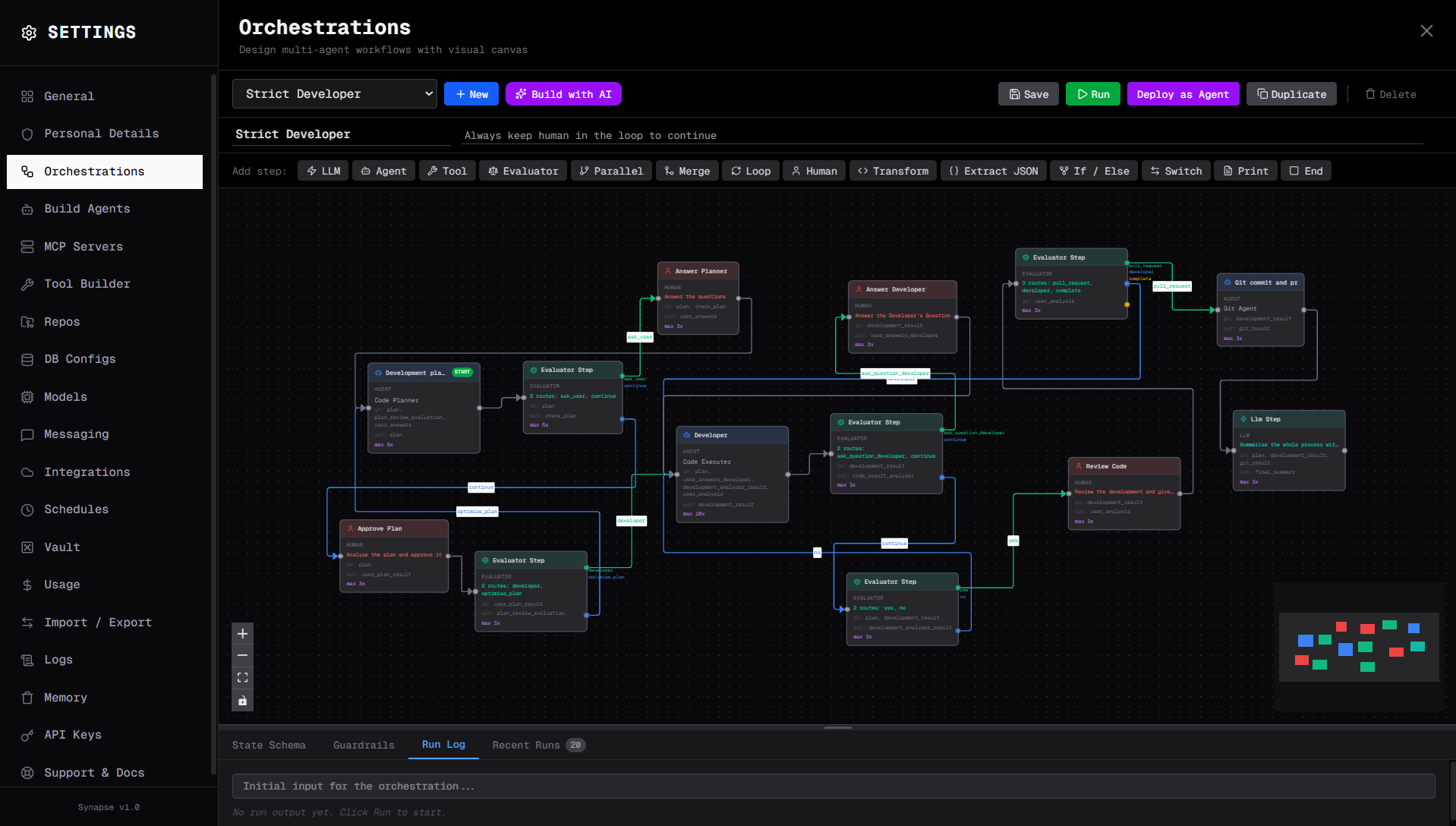
An orchestration is a deterministic, DAG-based workflow where you define every step, its type, and how data flows between steps. Unlike a free-form agent conversation, orchestrations give you full control over the execution path — no probabilistic routing surprises.
Core concepts
Shared state
Every orchestration has a shared state dictionary — a key-value store that passes through all steps. Each step reads values it needs from state (input_keys) and writes its result back into state (output_key).
Initial state: { "query": "What is Synapse AI?" }

Step 1 — Research Agent
  reads:  ["query"]
  writes: "research_output"

Step 2 — Writer Agent
  reads:  ["query", "research_output"]
  writes: "article"

Final state: { "query": "...", "research_output": "...", "article": "..." }
This explicit data contract makes orchestrations easy to debug — you always know exactly what each step received and produced.
State schema
The State Schema tab at the bottom of the canvas lets you define the expected shape of your shared state. For each key you add a type, an optional default value, and a description. The schema is used to generate input forms when you run the orchestration manually, and it documents the workflow's data contract for anyone building on top of it.
Step types
Synapse supports 14 step types for different purposes:
Agent — runs a configured agent in a full ReAct loop. The most common step type for tasks that require reasoning and tool use.
LLM — a direct LLM call with no tool use. Fast and cheap for classification, summarisation, and simple transformations.
Tool — forces exactly one specific tool call. Useful when you know precisely which tool should run and want to skip the full agent loop.
Evaluator — an LLM-based routing decision. The evaluator reads the current state and picks one of several named routes to jump to.
Parallel — runs multiple step sequences concurrently and waits for all to finish before continuing.
Merge — combines outputs from parallel branches into a single state value.
Loop — repeats a sequence of steps a fixed number of times.
Transform — runs a Python snippet on the shared state for data shaping and formatting.
If / Else — branches on a Python expression. True path goes one way, false goes another.
Switch — routes based on a Python expression matching one of several cases, with a default fallback.
Human — pauses the orchestration and waits for a human to submit input before continuing. Can optionally notify a messaging channel.
Extract JSON — parses a JSON string from a previous step's output and stores the parsed result in state.
Print — renders a markdown template with state variable interpolation.
End — terminates the orchestration and returns the final state.
Each step type is described in detail in Step Types.
Guardrails
Guardrails prevent runaway orchestrations from consuming unbounded resources. Configure them in the Guardrails tab at the bottom of the canvas.
Max Total Turns — the maximum number of LLM turns allowed across the entire run. Defaults to 100. When this limit is hit, the run stops with an error.
Timeout — maximum wall-clock time in minutes for the entire run. Defaults to 30 minutes.
Max Cost (USD) — optional hard budget cap. If the total LLM cost crosses this threshold, the run stops immediately. Leave blank for no cost limit.
Execution model
When a run starts, Synapse begins at the step designated as the entry point. Each step executes, reads from state, writes to state, then the next step is determined by the routing logic. Execution continues until an end step is reached, a guardrail is exceeded, or an unhandled error occurs.
The full step history — including timing, cost, and output for each step — is available in the Run Log panel and in the run response from the API.
Triggers
Orchestrations can be started in two ways.
Manual — run from the canvas using the Run button, or via the REST API. You supply the initial input when starting the run.
Scheduled — triggered automatically at a configured interval or cron schedule. Configure schedules in Settings → Schedules. See Scheduling for setup details.
AI Builder
Don't want to build the DAG manually? Click Build with AI on the orchestration page. Describe your workflow in plain text and Synapse generates the step structure, connections, and configuration for you. You can then refine it on the canvas.
See AI Builder for the full walkthrough.