REST API Tools
A REST API tool wraps an HTTP endpoint as an agent tool. The agent provides the parameters, Synapse makes the HTTP call, and the response is returned to the agent as the tool result.
Registering a REST API tool
Go to Settings → Custom Tools and click + New Tool. In the editor that opens, leave the type set to HTTP (the alternatives are n8n Webhook and Python).
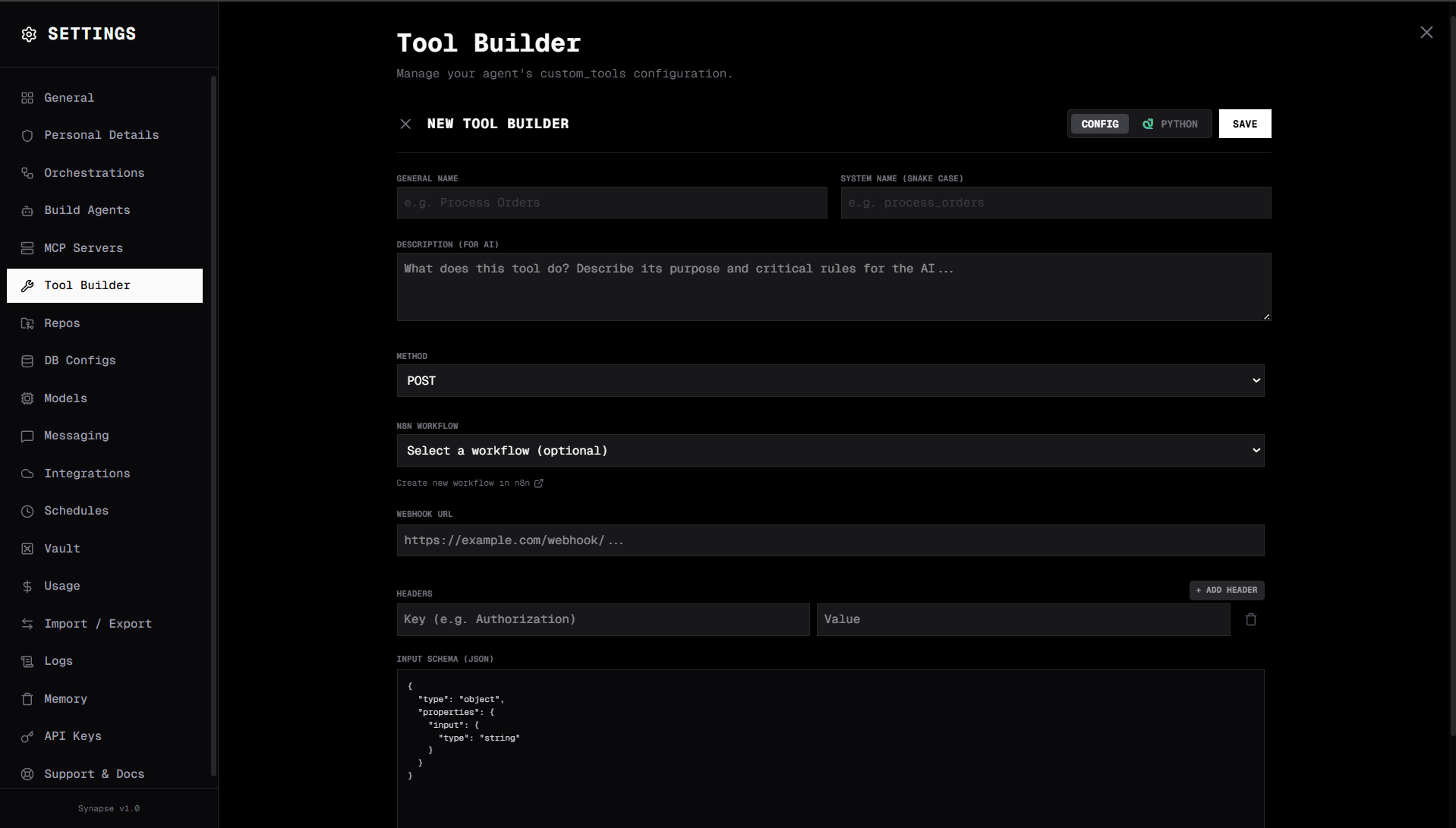
Fields
| Field | Description |
|---|---|
| General Name | Human-friendly name (e.g. Process Orders) |
| System Name (Snake Case) | Tool identifier the agent sees (e.g. process_orders) |
| Description (For AI) | What the tool does and critical rules — the agent reads this to decide when to call it |
| Method | HTTP method: GET, POST, PUT, DELETE, PATCH |
| URL | Endpoint URL (can include {param} placeholders) |
| Headers | Key/value pairs added with the + button. Values support {param} references |
| Body | Body template for non-GET methods. Supports {param} references |
| Input Schema (JSON) | JSON Schema describing what the agent must pass — see below |
Click Save when done. To verify before exposing the tool to an agent, use the Test button on the tool card.
Input schema
The Input Schema field is the one place where you do still paste JSON — it's a literal JSON Schema describing the tool's arguments, and the agent reads it to construct valid calls. Example placeholder shown in the field:
{
  "type": "object",
  "properties": {
    "city": {
      "type": "string",
      "description": "City name to get weather for"
    },
    "units": {
      "type": "string",
      "description": "Temperature units",
      "default": "celsius"
    }
  },
  "required": ["city"]
}
URL and body templating
Use {param_name} in URLs, headers, and body templates. Synapse substitutes the agent-provided values before making the request.
URL:  https://api.example.com/users/{user_id}/posts?page={page}
Body: { "title": "{title}", "content": "{content}" }
Worked examples
The shape below is what gets stored on disk — the UI fills it in for you as you complete the form.
Weather API
- General Name: Get Weather
- System Name:
get_weather - Description: "Get current weather for a city"
- Method:
GET - URL:
https://api.openweathermap.org/data/2.5/weather?q={city}&units={units}&appid=YOUR_KEY - Input Schema:
city(required string),units(optional string, defaultmetric)
Advanced: stored tool JSON
{
  "name": "get_weather",
  "generalName": "Get Weather",
  "description": "Get current weather for a city",
  "tool_type": "http",
  "method": "GET",
  "url": "https://api.openweathermap.org/data/2.5/weather?q={city}&units={units}&appid=YOUR_KEY",
  "headers": {},
  "parameters": [
    { "name": "city", "type": "string", "description": "City name", "required": true },
    { "name": "units", "type": "string", "description": "metric or imperial", "required": false, "default": "metric" }
  ]
}
Internal API with auth header
- General Name: Get Customer
- System Name:
get_customer - Method:
GET - URL:
https://api.internal.company.com/customers/{customer_id} - Headers:
Authorization: Bearer YOUR_INTERNAL_TOKEN,X-App-Version: 2.0 - Input Schema:
customer_id(required string)
Advanced: stored tool JSON
{
  "name": "get_customer",
  "generalName": "Get Customer",
  "description": "Fetch customer record by ID from our CRM",
  "tool_type": "http",
  "method": "GET",
  "url": "https://api.internal.company.com/customers/{customer_id}",
  "headers": {
    "Authorization": "Bearer YOUR_INTERNAL_TOKEN",
    "X-App-Version": "2.0"
  },
  "parameters": [
    { "name": "customer_id", "type": "string", "description": "Customer UUID", "required": true }
  ]
}
Webhook trigger (Slack)
- General Name: Send Slack Alert
- System Name:
send_slack_alert - Method:
POST - URL:
https://hooks.slack.com/services/YOUR/WEBHOOK/URL - Headers:
Content-Type: application/json - Body:
{ "text": "{message}" } - Input Schema:
message(required string)
Advanced: stored tool JSON
{
  "name": "send_slack_alert",
  "generalName": "Send Slack Alert",
  "description": "Send an alert message to the #alerts Slack channel",
  "tool_type": "http",
  "method": "POST",
  "url": "https://hooks.slack.com/services/YOUR/WEBHOOK/URL",
  "headers": { "Content-Type": "application/json" },
  "body": "{ \"text\": \"{message}\" }",
  "parameters": [
    { "name": "message", "type": "string", "description": "Alert message text", "required": true }
  ]
}
Authentication
| Method | How to configure in the UI |
|---|---|
| Bearer token | Add a header Authorization: Bearer YOUR_TOKEN |
| API key header | Add a custom header, e.g. X-API-Key: YOUR_KEY |
| Query parameter | Put it in the URL: ?api_key={api_key} and declare api_key in the Input Schema |
| No auth | Leave headers empty |
Testing
Each tool card has a Test button. Click it, enter sample values for the inputs you declared, and Synapse runs the request and shows the response — useful for sanity-checking templating and auth before an agent ever sees the tool.