Scheduling
Schedules let you run agents or orchestrations automatically on a time-based trigger — either on a fixed interval or a cron expression.
Creating a schedule
Go to Settings → Schedules → Add Schedule.
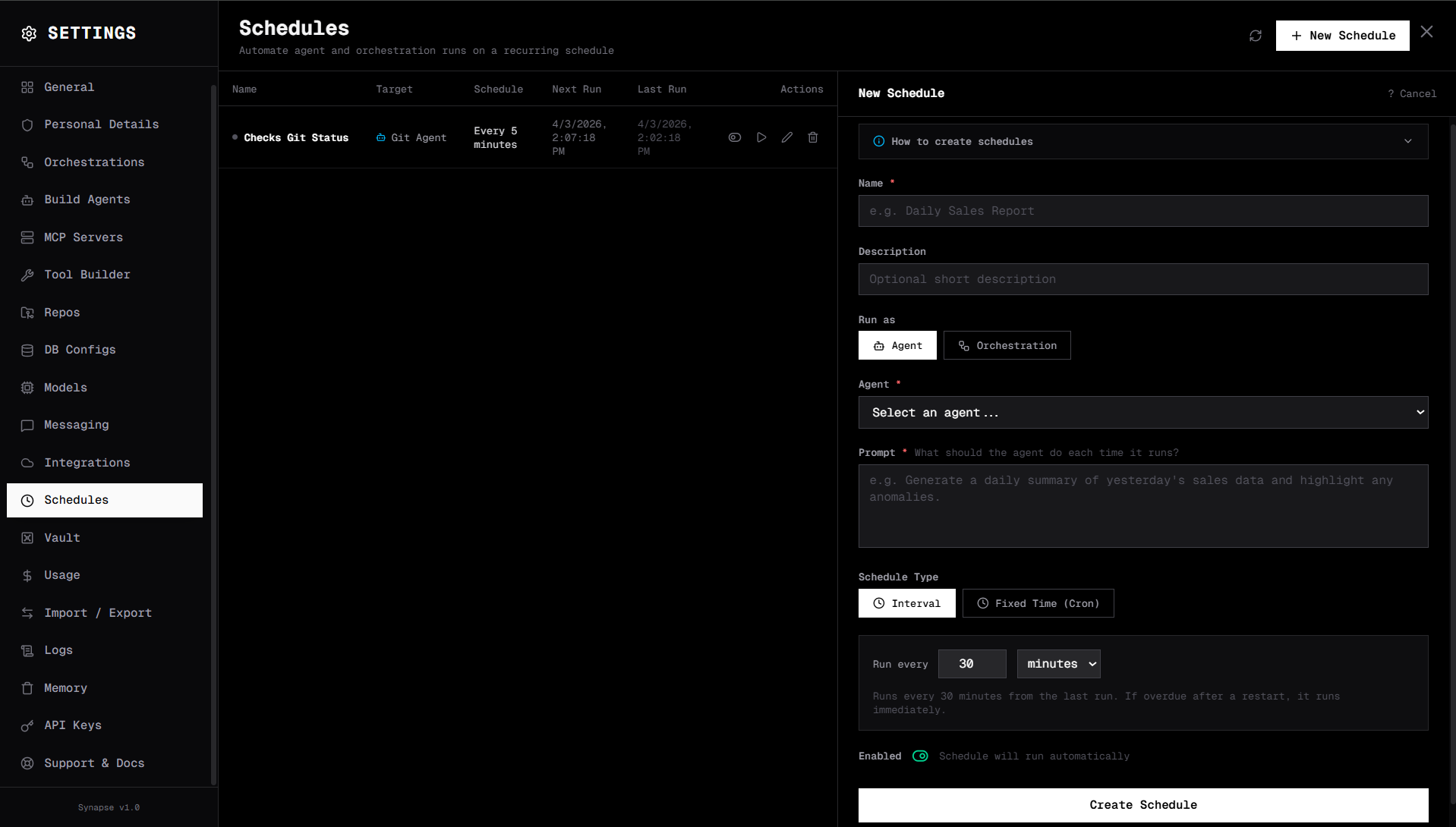
Fields
| Field | Type | Description |
|---|---|---|
| Name | string | Display name |
| Description | string | What this schedule does |
| Target type | agent or orchestration | What to run |
| Target | Agent / Orchestration | The specific agent or orchestration |
| Prompt | string | Initial message or input sent to the target |
| Schedule type | interval or cron | How to trigger |
| Enabled | bool | Active or paused |
| Missed run policy | run_immediately or skip | What to do if a run was missed (e.g. while Synapse was down) |
Interval schedules
Run every N minutes, hours, or days.
| Field | Description |
|---|---|
interval_value | The number (e.g. 30) |
interval_unit | minutes, hours, or days |
Examples:
- Every 30 minutes:
interval_value: 30,interval_unit: minutes - Every 6 hours:
interval_value: 6,interval_unit: hours - Every day:
interval_value: 1,interval_unit: days
Cron schedules
Use standard 5-field cron syntax for precise timing.
| Field | Description |
|---|---|
cron_expression | Standard cron (e.g. 0 8 * * 1-5) |
Examples:
| Expression | Meaning |
|---|---|
0 8 * * * | Every day at 8 AM |
0 8 * * 1-5 | Every weekday at 8 AM |
0 9,17 * * * | Twice daily at 9 AM and 5 PM |
0 0 1 * * | First day of each month at midnight |
*/15 * * * * | Every 15 minutes |
Cron uses UTC by default.
What happens when a schedule fires
- Synapse creates a new session for the run
- Sends the configured
promptto the target agent or orchestration - The agent runs its full ReAct loop
- Results are saved to logs
- If a messaging channel is configured on the target, the result is also sent to the channel
Manual trigger
To run a schedule immediately (without waiting for the next scheduled time):
- In the UI: click Run Now on the schedule card
- Via API:
curl -X POST http://localhost:8000/api/schedules/{schedule_id}/run
Missed runs
If Synapse was stopped and a scheduled run was missed:
| Policy | Behaviour |
|---|---|
run_immediately | Run the missed job immediately on restart |
skip | Skip the missed run, wait for the next scheduled time |
Example: Daily sales report
{
  "name": "Daily Sales Report",
  "description": "Run the sales report every morning at 8 AM",
  "target_type": "orchestration",
  "target_id": "orch-sales-report",
  "prompt": "Generate the sales report for yesterday",
  "schedule_type": "cron",
  "cron_expression": "0 8 * * 1-5",
  "enabled": true,
  "missed_run_policy": "skip"
}
Example: Hourly health check
{
  "name": "Hourly Health Check",
  "target_type": "agent",
  "target_id": "agent-monitor",
  "prompt": "Check all services and report any anomalies",
  "schedule_type": "interval",
  "interval_value": 1,
  "interval_unit": "hours",
  "enabled": true,
  "missed_run_policy": "run_immediately"
}