Step Types
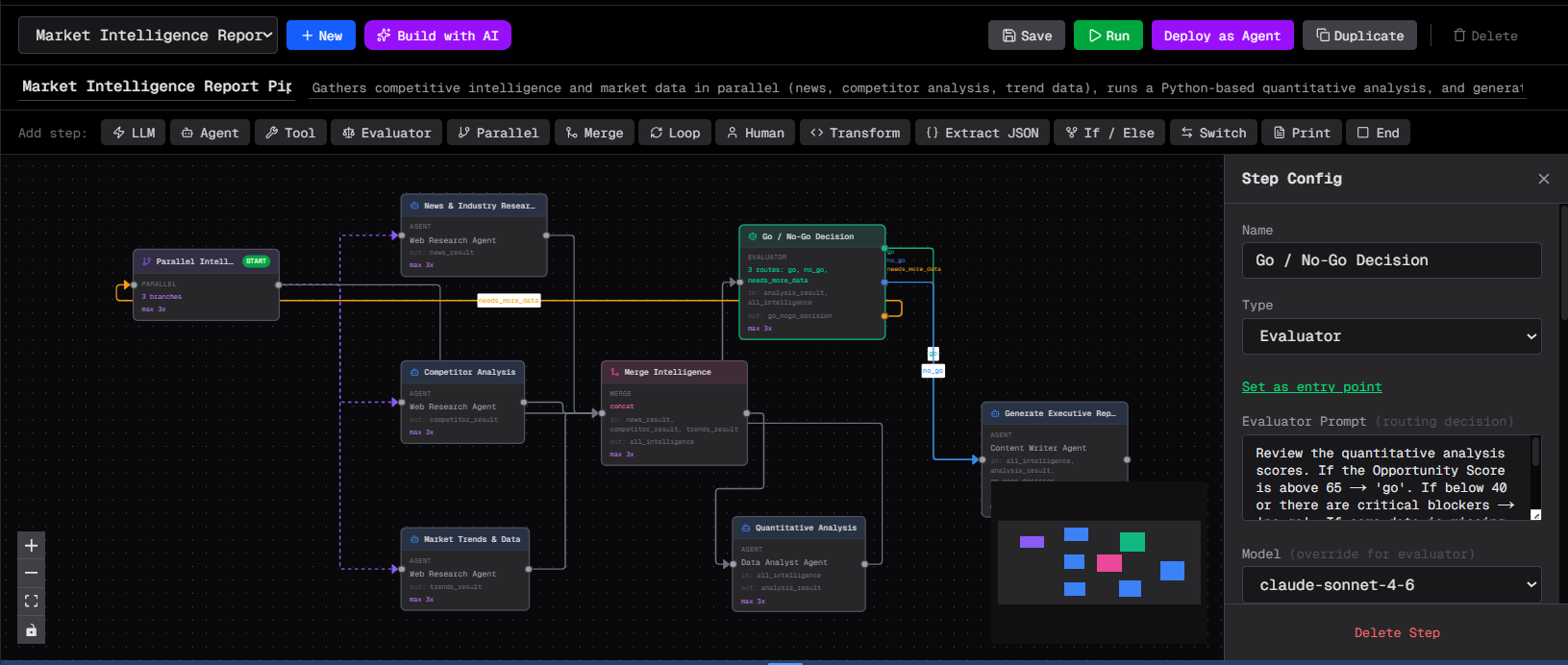
Each step is configured in the Step Config panel on the right side of the canvas. Select a step node to open its panel. Common settings appear at the top, followed by fields specific to that step type.
Common fields
Every step (except end) has these shared fields in the config panel:
Name — the display label shown on the canvas node.
Input Keys — comma-separated state keys this step reads as context. The step can reference these values in its prompt template using {state.key_name}.
Output Key — the state key where this step writes its result. Downstream steps can read this value via input_keys.
Next Step — the step to run after this one completes (for linear flows). Leave blank to end the orchestration after this step.
Guardrails — per-step limits for Max Turns (how many ReAct loop iterations), Timeout in seconds, and Max Iterations (loop guard for steps that repeat).
Agent
The Agent step runs a configured agent in a full ReAct loop. The agent gets the input keys from state as context, reasons with its tools, and writes its final response to the output key.
Agent — select which agent to run from the dropdown. Only agents you have configured appear here.
Prompt Template — instructions sent to the agent. Use {state.key_name} to inject values from the shared state. If left blank, the agent receives the input keys as plain context.
Model Override — optionally override the model for this step only.
Advanced: equivalent settings.json shape
{
  "id": "step-research",
  "type": "agent",
  "name": "Research",
  "agent_id": "agent-researcher",
  "prompt_template": "Research this topic thoroughly: {state.query}",
  "input_keys": ["query"],
  "output_key": "research_results",
  "next_step_id": "step-writer",
  "model": "claude-3-5-sonnet-20241022"
}
LLM
The LLM step makes a direct LLM call with no tool use. No agent, no ReAct loop — just a prompt in and a response out. Use it for fast classification, summarisation, or simple text transformations where tools are not needed.
Prompt Template — the full prompt sent to the model. Use {state.key_name} for state interpolation.
Model Override — override the model for this step.
Cache responses — toggle on to short-circuit identical (or near-identical) calls. See Caching → Response cache.
Advanced: equivalent settings.json shape
{
  "id": "step-classify",
  "type": "llm",
  "name": "Classify Intent",
  "prompt_template": "Classify this text as: question, complaint, or feedback.\n\nText: {state.user_message}\n\nRespond with a single word.",
  "input_keys": ["user_message"],
  "output_key": "intent",
  "next_step_id": "step-router",
  "model": "claude-haiku-4-5-20251001"
}
Tool
The Tool step forces exactly one specific tool call, skipping the full ReAct loop. The agent makes precisely one tool call and writes the result to the output key. Use this when you know exactly which tool should run.
Tool — select the tool from the dropdown. All tools available to the selected agent appear here.
Prompt Template — instructions framing the tool call.
Advanced: equivalent settings.json shape
{
  "id": "step-scrape",
  "type": "tool",
  "name": "Scrape URL",
  "agent_id": "agent-scraper",
  "forced_tool": "scrape_url",
  "prompt_template": "Scrape this URL: {state.target_url}",
  "input_keys": ["target_url"],
  "output_key": "page_content",
  "next_step_id": "step-parse"
}
Evaluator
The Evaluator step is an LLM-based router. The LLM reads the current state and chooses one of several named routes. The orchestration then jumps to the step mapped to that route.
Evaluator Prompt — instructions telling the LLM how to decide which route to pick. Include context about what each route means.
Routes — a dynamic list of route definitions. Each route has a Label (the value the LLM must output), a Target Step, and a Description (shown to the LLM to explain what the route is for). Add routes with the + button.
Model Override — use a cheaper/faster model for routing decisions.
Advanced: equivalent settings.json shape
{
  "id": "step-route",
  "type": "evaluator",
  "name": "Route Request",
  "evaluator_prompt": "Based on the user's request, decide which department should handle it.",
  "route_map": {
    "billing": "step-billing-agent",
    "technical": "step-tech-agent",
    "general": "step-general-agent"
  },
  "route_descriptions": {
    "billing": "Payment, invoice, or subscription questions",
    "technical": "Bug reports, API issues, or technical problems",
    "general": "Everything else"
  },
  "input_keys": ["user_request"],
  "model": "claude-haiku-4-5-20251001"
}
Parallel
The Parallel step runs multiple step sequences at the same time. Each branch is a list of step IDs that execute sequentially within that branch. All branches run concurrently and the orchestration waits for every branch to complete before moving to the next step.
Branches — a list of entry steps, one per branch. Each entry step ID identifies the start of a sequential sub-path.
Advanced: equivalent settings.json shape
{
  "id": "step-parallel",
  "type": "parallel",
  "name": "Research in Parallel",
  "parallel_branches": [
    ["step-web-research"],
    ["step-db-lookup"],
    ["step-doc-search"]
  ],
  "next_step_id": "step-merge"
}
Follow a Parallel step with a Merge step to combine the results.
Merge
The Merge step combines outputs from parallel branches into a single state value. Choose a merge strategy based on the type of data you're combining.
Merge Strategy options:
- list — wraps all input values in a JSON array
- concat — joins all string inputs with newlines into one string
- dict — merges all dict inputs into one flat dict
Advanced: equivalent settings.json shape
{
  "id": "step-merge",
  "type": "merge",
  "name": "Merge Research",
  "merge_strategy": "concat",
  "input_keys": ["web_results", "db_results", "doc_results"],
  "output_key": "combined_research",
  "next_step_id": "step-writer"
}
Loop
The Loop step repeats a sequence of steps a fixed number of times. The body steps run sequentially on each iteration, then the next iteration begins.
Loop Count — how many times to repeat the body.
Body Steps — the ordered list of steps to execute each iteration.
Advanced: equivalent settings.json shape
{
  "id": "step-loop",
  "type": "loop",
  "name": "Retry 3 Times",
  "loop_count": 3,
  "loop_step_ids": ["step-attempt", "step-check"],
  "next_step_id": "step-finish"
}
Transform
The Transform step runs arbitrary Python code on the shared state. The state dict is available in scope and any modifications you make are persisted to the shared state for downstream steps.
Python Code — edited in a syntax-highlighted CodeMirror editor in the config panel.
Advanced: equivalent settings.json shape
{
  "id": "step-format",
  "type": "transform",
  "name": "Format Output",
  "transform_code": "state['formatted'] = state['raw'].upper().strip()",
  "input_keys": ["raw"],
  "output_key": "formatted",
  "next_step_id": "step-end"
}
If / Else
The If/Else step branches on a Python expression evaluated against the shared state.
Condition — a Python expression that evaluates to True or False. You can reference any state key via state.get('key').
True Path — the step to jump to when the condition is true.
False Path — the step to jump to when the condition is false.
Advanced: equivalent settings.json shape
{
  "id": "step-check",
  "type": "if_else",
  "name": "Check Quality",
  "if_condition": "len(state.get('article', '')) > 500",
  "if_true_step_id": "step-publish",
  "if_false_step_id": "step-rewrite",
  "input_keys": ["article"]
}
Switch
The Switch step routes based on a Python expression value matching one of several defined cases.
Expression — a Python expression whose result is compared against the case values.
Cases — a list of case definitions. Each case has a value and a target step. Add cases with the + button.
Default Path — the step to run if no case matches.
Advanced: equivalent settings.json shape
{
  "id": "step-switch",
  "type": "switch",
  "name": "Route by Status",
  "switch_expression": "state.get('status', 'unknown')",
  "switch_cases": {
    "approved": "step-publish",
    "rejected": "step-archive",
    "pending": "step-review"
  },
  "switch_default_step_id": "step-end",
  "input_keys": ["status"]
}
Human
The Human step pauses the orchestration and waits for a person to submit input. The run is stored as paused and can be resumed from the canvas Run Log or via the resume API endpoint.
Prompt for Human — the message shown to the person who needs to act. Supports {state.key} interpolation to include relevant context from previous steps.
Notify Messaging Channel — optionally send a notification to a Slack, Discord, Telegram, Teams, or WhatsApp channel when the run pauses. The person can then respond directly in the channel.
Timeout — if a messaging channel is selected, how many seconds to wait before timing out. Defaults to 3600 (1 hour).
Fields — define the form the human fills in. Each field has a name, a type (text or select), and a label. For select fields, list the options comma-separated.
Advanced: equivalent settings.json shape
{
  "id": "step-approve",
  "type": "human",
  "name": "Manager Approval",
  "human_prompt": "Review the draft report and approve or reject it.\n\n{state.draft_report}",
  "human_fields": [
    { "name": "decision", "type": "select", "label": "Decision", "options": "approve,reject" },
    { "name": "comments", "type": "text", "label": "Comments" }
  ],
  "human_channel_id": "slack-channel-id",
  "human_timeout_seconds": 3600,
  "input_keys": ["draft_report"],
  "next_step_id": "step-publish"
}
See Human Gates for the full resume walkthrough.
Extract JSON
The Extract JSON step parses a JSON string produced by a previous step and stores the parsed result in the shared state.
Advanced: equivalent settings.json shape
{
  "id": "step-extract",
  "type": "extract_json",
  "name": "Extract Fields",
  "input_keys": ["raw_json_output"],
  "output_key": "parsed_data",
  "next_step_id": "step-next"
}
Print
The Print step renders a markdown template with state variable interpolation and writes the rendered string to the output key. Use it to compose final reports or summaries before saving to vault.
Content — the markdown template. Use {state.key} for interpolation.
Advanced: equivalent settings.json shape
{
  "id": "step-report",
  "type": "print",
  "name": "Final Report",
  "print_content": "# Report: {state.topic}\n\n{state.article}\n\n---\nGenerated at {state.timestamp}",
  "input_keys": ["topic", "article", "timestamp"],
  "output_key": "final_report",
  "next_step_id": "step-end"
}
End
The End step terminates the orchestration. The current shared state is returned as the final run result.
Advanced: equivalent settings.json shape
{
  "id": "step-end",
  "type": "end",
  "name": "Done"
}
Every orchestration must have at least one End step. All possible execution paths must eventually reach an End step.