Evaluate a Knowledge Base
Measure how often a knowledge base finds the answer to questions about its own documents, compare settings and index versions side by side, and grade answers with a judge.
Whether a base finds the right passage is a question with an answer. Evaluate, on the base's page, keeps sets of questions whose answers you know, searches each one, and reports where the answer ranked — so a change of settings, of embedding model or of Contextual Retrieval is a number going up or down, not an impression.
Scoring the searches needs no model and costs only the searches. Grading the answers an agent would give is optional, and paid.
This is separate from Evals, which score finished workflow runs.
Question sets
A set holds up to 200 questions. Each records where its answer is written — a document and the words in it — rather than a passage, so the question still holds after the base is cut into passages differently. If the words leave the document, the question is marked No longer in its document and left out of the scores.
There are two ways to fill a set:
Draft questions. A model writes questions from the base's own passages and copies the words that answer each, in three kinds:
| Kind | |
|---|---|
| Direct | Asked plainly |
| Paraphrased | In other words than the passage — the hard case for a keyword search. Each shows how many of its words are the passage's own |
| Multi-hop | Needs two documents |
Up to 10 at a time, priced before you draft. They come back as suggestions — Add all, Dismiss all, or Add one at a time — and nothing is saved until you add them. A draft is left out when its quote is not in the passage, when it only repeats the passage's words, or when no passage was left to ask about; the count says why. Drafting needs passages of some length, so a base of a few short notes may get none.
From recent searches. Pick a search someone made in the last 30 days and tick the passages (up to four) that answer it. It joins the set as a Real search, and is kept past the 30-day cleanup.
Any question can be edited. Expected answer is for the people reading the results; the scores do not use it.
Running a set
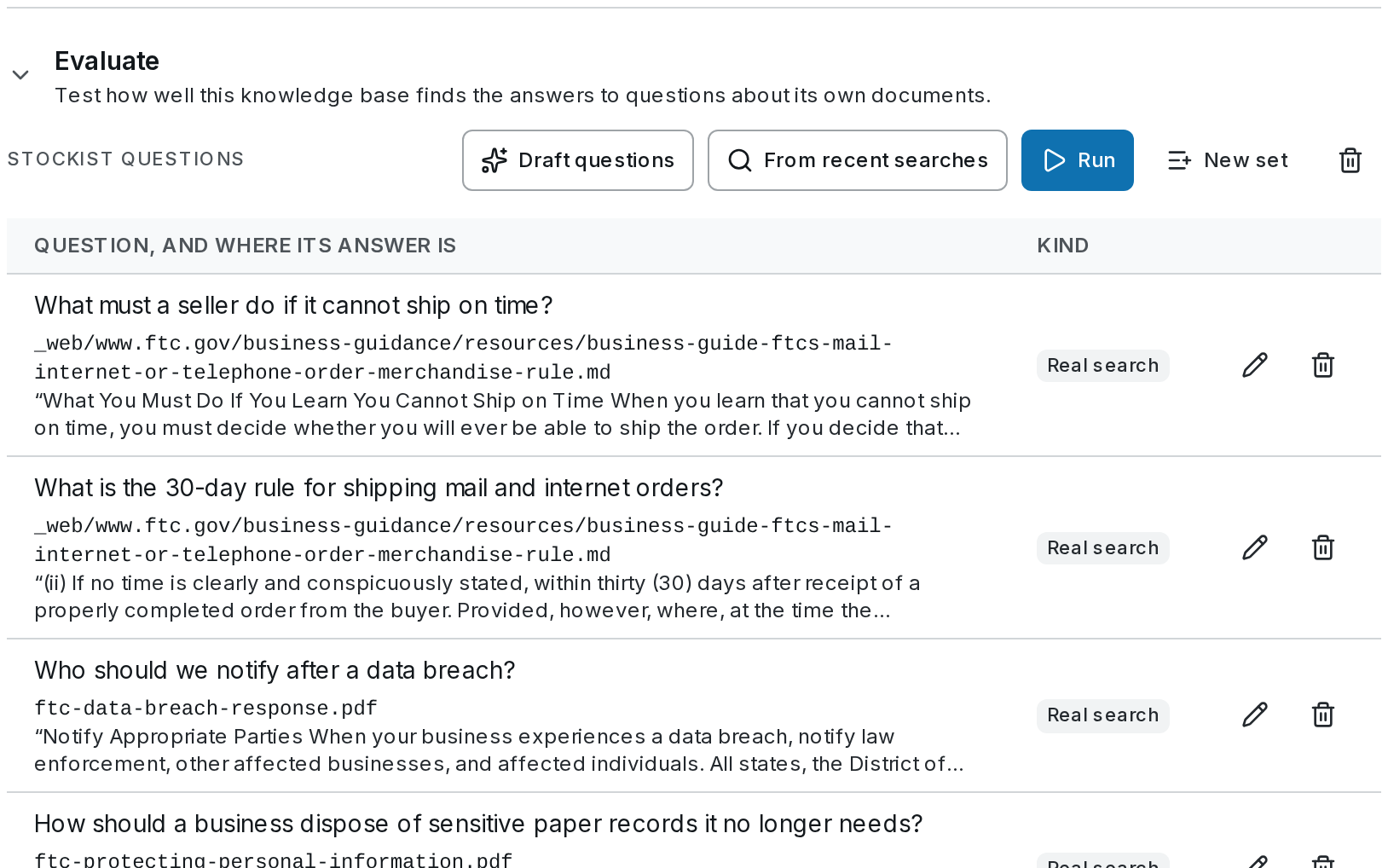 Run searches each question once in each index you pick — up to three:
- The index serving now
- The index being rebuilt, while a rebuild is under way
- A replaced index, kept for a week after a rebuild
so a rebuild can be judged against what it replaces before, or after, it switches. Rerank is as the base serves searches, or off.
From each search, four rankings are scored at no extra cost:
| Ranking | |
|---|---|
| Keyword only | The keyword search on its own |
| Meaning only | The meaning search on its own |
| Hybrid (fused) | The two fused, as the base fuses them |
| As served | What a search returns, reranked if the base reranks |
And for each, six scores:
| Score | |
|---|---|
| Hit@1, Hit@5, Hit@10 | The share of questions whose answer is in the top 1, 5 or 10 passages |
| MRR | How high the answer ranks, on average — 1 when it is always first |
| nDCG@10 | The same over the top 10, counting every passage that holds the answer |
| Recall@10 | The share of a question's answer passages found in the top 10 |
The best in each column is bold. Indexes are compared only on questions every one of them can answer. As served, an agent gets the top 8: hits further down are this test's own view — a passage at rank 9 exists, but an agent with the base's settings never sees it.
Try weights ($0), after a run, scores other keyword and meaning weights from the searches already made, without searching again — a quick way to choose the base's fusion weights.
Each question opens to its rank in every ranking, the top passages with the one holding the answer marked, and the search's trace.
Grading answers
Ticking Grade answers (paid) adds what retrieval scores cannot: whether an answer built on the passages says only what they say.
- An answer model answers each question from the passages an agent would get — the base's own number of passages, laid out as a Retrieve step lays them out.
- The quote check runs on each answer, free: Quotes found word for word: 14 of 15.
- A judge model scores each answer with the rubric Grounded in cited sources, 0–10: is each claim supported by the passages, is it cited, and does the answer say so when the passages do not hold it.
The judge must come from another model family than the answer model: a model grades its own family's answers too kindly, so the same family is refused before the run starts. Results show Grounded in cited sources: 8.5 / 10 and each answer with the judge's reasoning.
Re-runs by themselves
When a rebuild switches the base to a new index, or a search setting changes — rerank, fusion, the number of passages — every set that has run before runs again by itself, without grading. Its run is marked after a settings change, and the summary shows the change: hit@5 +7 points since the run before. A change to the fusion weights alone is scored again from the stored searches, at no cost.
Cost
A run is priced before it starts. Its searches cost what any search costs and count toward the base's monthly budget: a run that would cross it is refused, and one that reaches it stops. Drafting and grading are model calls, priced before, and outside the budget. Each finished run shows what it cost.
On SynapseOrch Cloud
- Everyone in the workspace sees the sets and their results; builders, admins and owners draft, run and edit.
- A workspace runs as many evaluations at once as its plan runs workflows — Free 1, Solo 2, Team 8, Growth 12, Business 25 — counted separately from workflow runs. Past that: Your plan runs 1 evaluation at a time. Wait for one to finish, or cancel one.
- A run has two hours. It stops itself just before, keeping what it scored.
- Drafting waits up to three minutes, and keeps the questions written by then.
On either product a set runs once at a time: A run of this question set is already under way.
Agents, Chat and Workflows
Give an agent knowledge bases, read the sources under its answers, let widget visitors search, and search or fill bases from a workflow with the Retrieve and Ingest steps.
Boards
Cards of shared work that agents read, claim and close: notes and tasks, turning Boards on, a workflow's and a schedule's own boards, shared boards and who may use them, and the limits.