The public API
Start a workflow from your own code, follow it to the end, answer it when it stops for a person, and be called back when it finishes — with worked examples.
Anything you run in the app, your own systems can run too. Harbor & Pine's storefront asks Answer a customer question when a stockist writes in, and its accounts system starts Invoice triage for each new invoice. This guide does both from the command line, with curl; any language that speaks HTTP does the same.
You start a run with an API key and get its id back at once. On SynapseOrch Cloud a run waits its turn when the plan's runs at once are all busy, then runs. It ends completed with its response, paused with a question for a person — which you can answer through the API, so it carries on — or failed, saying why. You learn which by polling its status, by following its event stream, or by giving it a URL to call when it ends.
Get a key
Create it
Open Settings → Developer. Under Create a key, name it after what will use it — Harbor & Pine's is Storefront sync — and press Create key. Leave Can also build off for a key that only runs things, as Storefront sync does. Owners and admins make keys.
Copy it now
The key, sk-syn- and 32 characters, is shown once; only a hash is kept, so a lost key cannot be recovered — revoke it and make another. Keep it where your code reads secrets, never in the code itself:
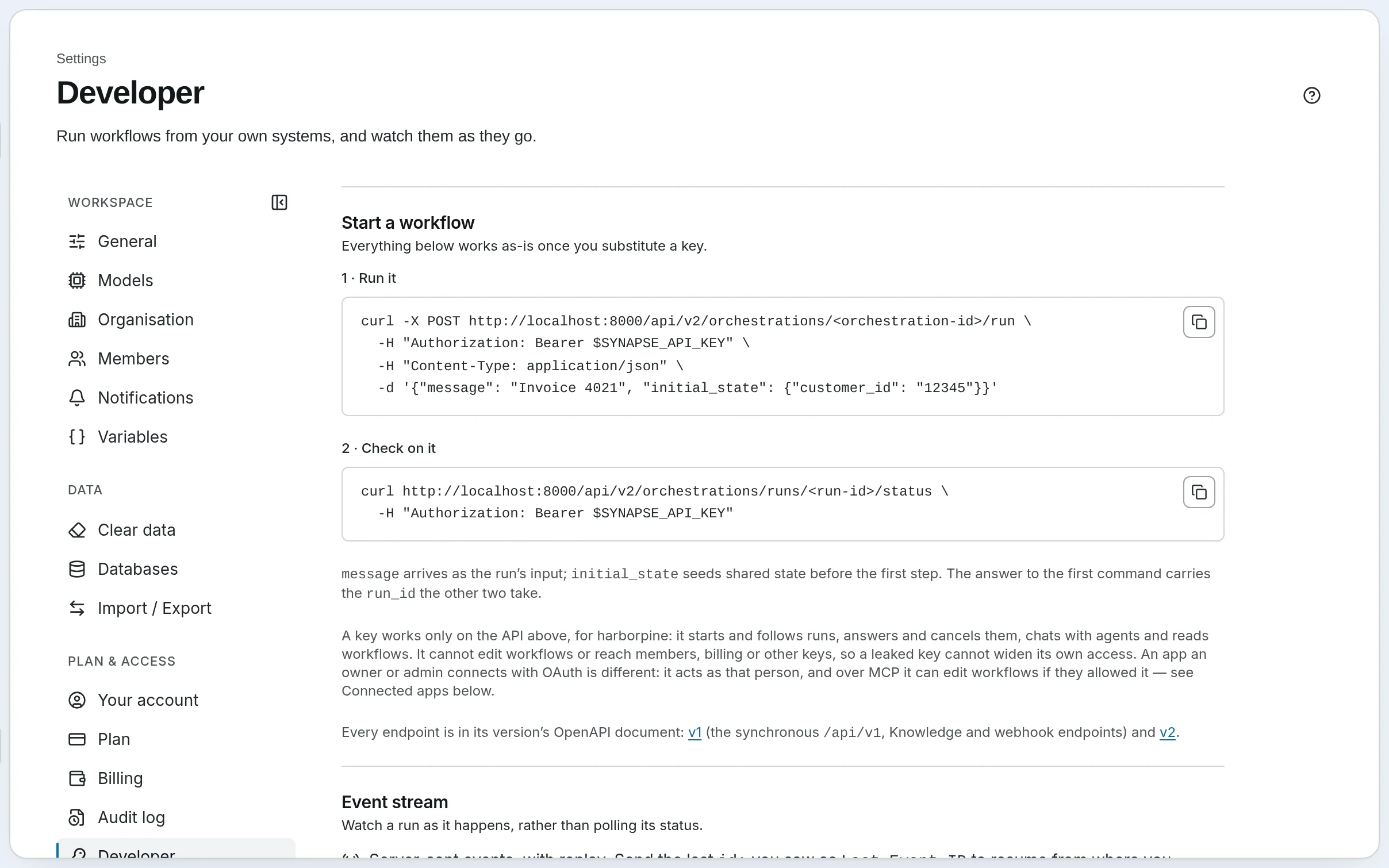
export SYNAPSE_API_KEY=sk-syn-...While the key is on screen, Start a workflow fills it into two commands you can copy and run as they are.
A key acts for the whole workspace, on the API and over MCP. Every key can read what is there, start, follow, answer and cancel runs, and chat with agents. Only a key made with Can also build changes agents, workflows, schedules, knowledge bases or webhook endpoints. No key reaches members, billing or other keys, so a leaked key cannot widen its own access. Revoke one under Keys; anything using it stops at its next request. See API Keys and the Developer Page.
Run a workflow
Every call goes to https://api.synapseorch.com with the key as a Bearer token. You need the workflow's id: copy it from the row's menu on the Workflows page, or list them with GET /api/v2/orchestrations.
Start the run
curl -X POST https://api.synapseorch.com/api/v2/orchestrations/<orchestration-id>/run \
  -H "Authorization: Bearer $SYNAPSE_API_KEY" \
  -H "Content-Type: application/json" \
  -d '{"message": "Do you ship within 30 days?"}'
message is the run's input: it lands in state.user_input, which is what the workflow's first step searches for. The answer comes back at once, 202, while the run goes on:
{
  "run_id": "run_01a10a1553d57036bae3d17421a4ba16",
  "status": "queued",
  "stream_url": "/api/v2/orchestrations/runs/run_01a10a1553d57036bae3d17421a4ba16/stream",
  "status_url": "/api/v2/orchestrations/runs/run_01a10a1553d57036bae3d17421a4ba16/status"
}
When the plan's runs at once are all busy, the answer also carries queue_position, the run's place in line.
Check on it
curl https://api.synapseorch.com/api/v2/orchestrations/runs/<run-id>/status \
  -H "Authorization: Bearer $SYNAPSE_API_KEY"
status is queued, running, paused, completed, failed or cancelled. Once the run has ended, the same answer carries what it made:
{
  "run_id": "run_01a10a1553d57036bae3d17421a4ba16",
  "status": "completed",
  "waiting_for_human": false,
  "total_cost_usd": 0.0002,
  "total_tokens_used": 4133,
  "started_at": "2026-10-04T17:52:12Z",
  "ended_at": "2026-10-04T17:52:17Z",
  "response": "Yes. Under the FTC's Mail Order Rule we ship within 30 days when no other time is stated [K1]…",
  "shared_state": { "user_input": "Do you ship within 30 days?", "sources": { "…": "…" }, "answer": "…" }
}
response is the run's result — the workflow's Result key. A run that did not complete says why in error. Poll every few seconds; a run has nothing new to say until its next step ends.
Or follow it live
curl -N https://api.synapseorch.com/api/v2/orchestrations/runs/<run-id>/stream \
  -H "Authorization: Bearer $SYNAPSE_API_KEY"
The stream sends the run's events as they happen — each an id: line and a data: line of JSON with its type, such as orchestration_start — and closes after the done event. If the connection drops, reconnect with the last id: you saw as Last-Event-ID, and it picks up where it left off. In a browser, read it with fetch and the Authorization header — an EventSource cannot send the header, and a key in the URL is refused.
Answer a run that stops for a person
Invoice triage needs the invoice in its state before its first step, and pauses for approval when an invoice is over $5,000 or from a supplier not yet approved. The accounts system passes the invoice as initial_state:
curl -X POST https://api.synapseorch.com/api/v2/orchestrations/<orchestration-id>/run \
  -H "Authorization: Bearer $SYNAPSE_API_KEY" \
  -H "Content-Type: application/json" \
  -d '{
        "message": "INV-1047",
        "initial_state": {
          "invoice": {
            "number": "INV-1047", "supplier": "Saltmarsh Logistics", "currency": "USD",
            "lines": [{ "sku": "SL-PALLET-RUN", "qty": 6, "unit_price": 385.00 }]
          }
        }
      }'
Saltmarsh Logistics is not on the approved list, so the run pauses. Its status says so, with the question and the fields to answer:
{
  "run_id": "run_01a10843ee6d704bbccfb11933a861d1",
  "status": "paused",
  "waiting_for_human": true,
  "human_input_required": {
    "step_id": "approve",
    "prompt": "Invoice INV-1047 from Saltmarsh Logistics totals $2,310.00 (supplier not on the approved list). Approve payment?",
    "fields": [
      { "name": "approved", "type": "boolean", "label": "Approve payment" },
      { "name": "comment", "type": "textarea", "label": "Note for the ledger" }
    ]
  }
}
Answer with the fields by name. The answer is 202 with "status": "resuming", and the run carries on from the next step:
curl -X POST https://api.synapseorch.com/api/v2/orchestrations/runs/<run-id>/resume \
  -H "Authorization: Bearer $SYNAPSE_API_KEY" \
  -H "Content-Type: application/json" \
  -d '{"response": {"approved": true, "comment": "Onboarding signed off; pay net-15."}}'
The question is on the run's page in the app too, and whichever answer arrives first resumes the run. A run can wait for days; waiting costs nothing.
Be called when it ends
Rather than polling, give the run a URL to call when it ends:
{
  "message": "Do you ship within 30 days?",
  "webhook_url": "https://shop.harborpine.example/hooks/synapse",
  "webhook_secret": "a-long-random-string"
}
The call is signed with your webhook_secret, so your server can check it came from SynapseOrch. On SynapseOrch Cloud the URL must be a public https address. The same two fields work on /resume, and on a chat turn. For events beyond one run — a knowledge base document indexed, for one — register a webhook endpoint.
Talk to an agent instead
When the question decides the steps, send it to an agent:
curl -X POST https://api.synapseorch.com/api/v1/chat \
  -H "Authorization: Bearer $SYNAPSE_API_KEY" \
  -H "Content-Type: application/json" \
  -d '{"message": "What are your payment terms for a new account?", "agent": "Order desk"}'
/api/v1/chat waits for the agent's answer and returns it with a session_id; pass that back with the next message to carry the conversation on. See Chat API.
When something goes wrong
| Answer | Means | Do |
|---|---|---|
401 | The key is missing, wrong or revoked | Check the Authorization header |
402 | Not enough execution credits to start this run, or the subscription payment is past due | Buy credits or update the card under Settings → Billing |
404 | No such workflow, run or agent in this workspace | Check the id |
422 | The body is wrong — an unknown field, an initial_state key starting with _, a webhook that is not https | Read the error's detail |
429 | A rate limit, or as many runs already waiting as the plan allows | Wait for Retry-After |
Every answer carries X-RateLimit-Remaining and X-RateLimit-Reset for the limit closest to running out. See Error codes.
Go further
- REST API Reference — every endpoint in
/api/v1and/api/v2, rate limits and errors - Orchestrations API — runs, streams, resume and cancel in full
- Synapse as an MCP Server — the same key, for Claude, Cursor and other MCP clients
- The API reference — a page per endpoint, with samples in cURL, JavaScript, Python and Go, made from the OpenAPI documents:
https://api.synapseorch.com/api/v1/openapi.jsonand/api/v2/openapi.json
The wallet and plans
What a workspace on SynapseOrch Cloud pays for and how: execution credits for running workflows, the model wallet for SynapseOrch's models, plans, and what happens at the limit.
Start a run from Zapier, Make or n8n
Start a workflow from another tool's webhook step with an API key: the request, which API to call for a short or a long workflow, and getting the result back.