Score runs with evals
Write a rubric, have a judge model score every run against it, hear when a score falls, and re-run a fixed set of questions after every change.
A run that finished without an error has not necessarily done its job well. Evals answer the other question: was the answer any good, and is it getting worse? You describe what good looks like in a rubric, a judge model scores every finished run against it, and a run that scores badly is flagged.
Harbor & Pine scores every run of Answer a customer question, because those answers go to stockists.
Write a rubric
Name it and set the scene
Open Runs › Evals and press New rubric. Give it a Name — Customer answer quality — and under What the judge should keep in mind, the context that applies to every criterion: How well an answer to a stockist's question serves them.
Add criteria
Press Add criterion for each thing to judge, with guidance the judge can check. Accurate judges nothing; every claim comes from the cited passages judges something. Harbor & Pine's four:
| Criterion | Guidance |
|---|---|
| Grounded | Every claim comes from the cited passages. |
| Answers the question | Says what the stockist should expect or do. |
| Tone | Plain, courteous, no jargon. |
| Concise, with citations | Under 120 words, citing [K#] labels. |
Say what counts as a bad score
- Scale max — the top of the scale; 10 by default.
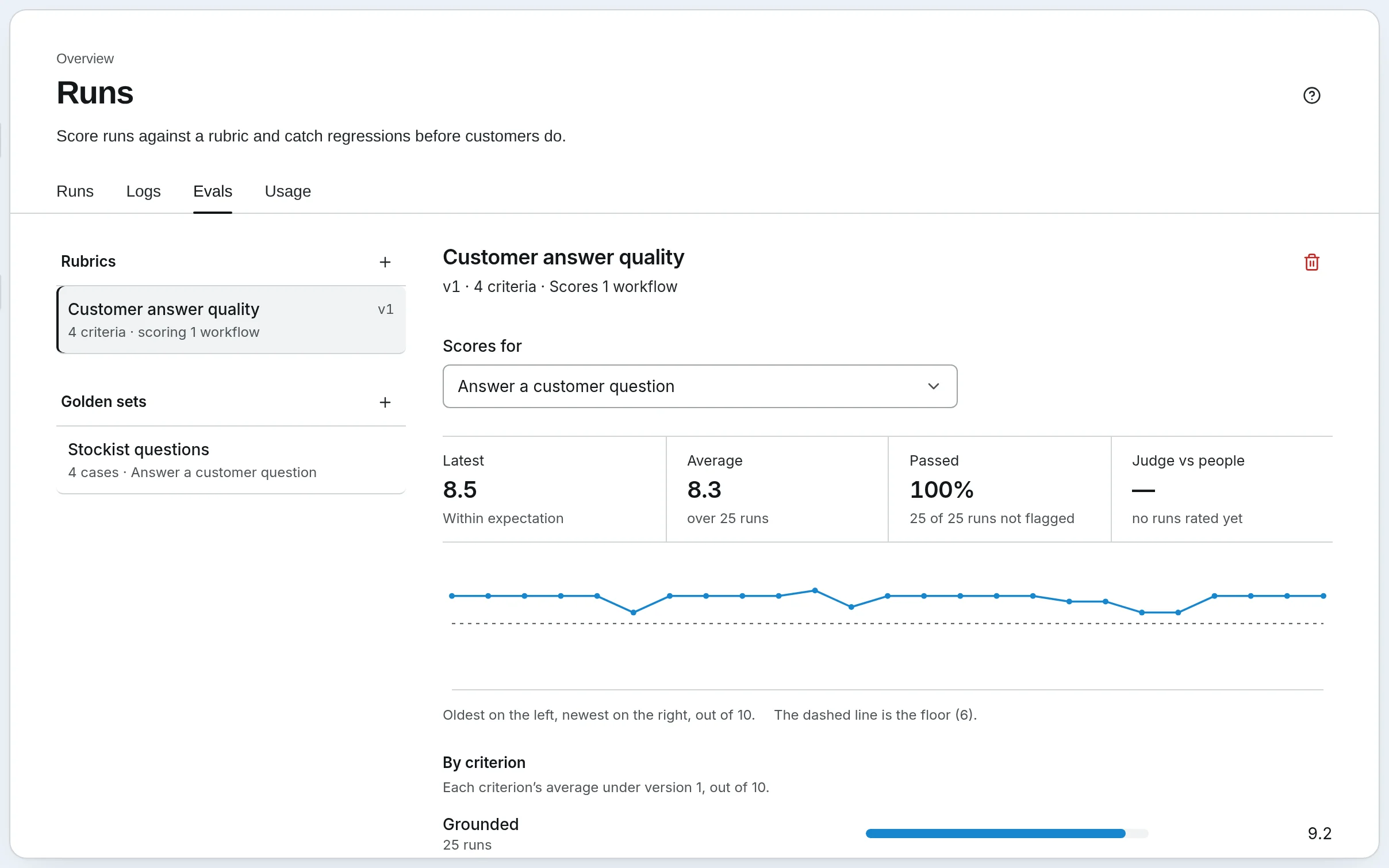
- Floor — a score below this is flagged, however the run did before. It is the rule that guards a new workflow with no history. Harbor & Pine's is 6.
- Drop — a fall this far below the mean of recent runs is flagged: the slow slide from 9 to 7.5 that never crosses the floor. It waits for three scores before it says anything.
Leave either empty to turn it off. Press Save rubric.
Bind it to the workflow
Open the workflow in the editor, open Workflow settings, and under Guardrails choose the rubric in Score runs against. Save. From now on each run is judged when it finishes: one model call per run, which can never fail the run it scores.
If the workflow has runs from before, open the rubric, pick the workflow and press Score earlier runs, so the floor and the trend have something to work with straight away.
Read the scores
Open the rubric and choose the workflow in Scores for: its latest score, its average, the trend, and the recent runs with each one's score, the ones that broke the floor or the drop flagged.
Rate a scored run with the thumbs to say whether you agree with the judge. A rubric that people keep disagreeing with needs better guidance.
Re-run fixed questions after a change
Live runs answer whatever people asked that week, so their scores move with the questions. A golden set holds the questions still: when its score moves, the workflow changed.
Make the set
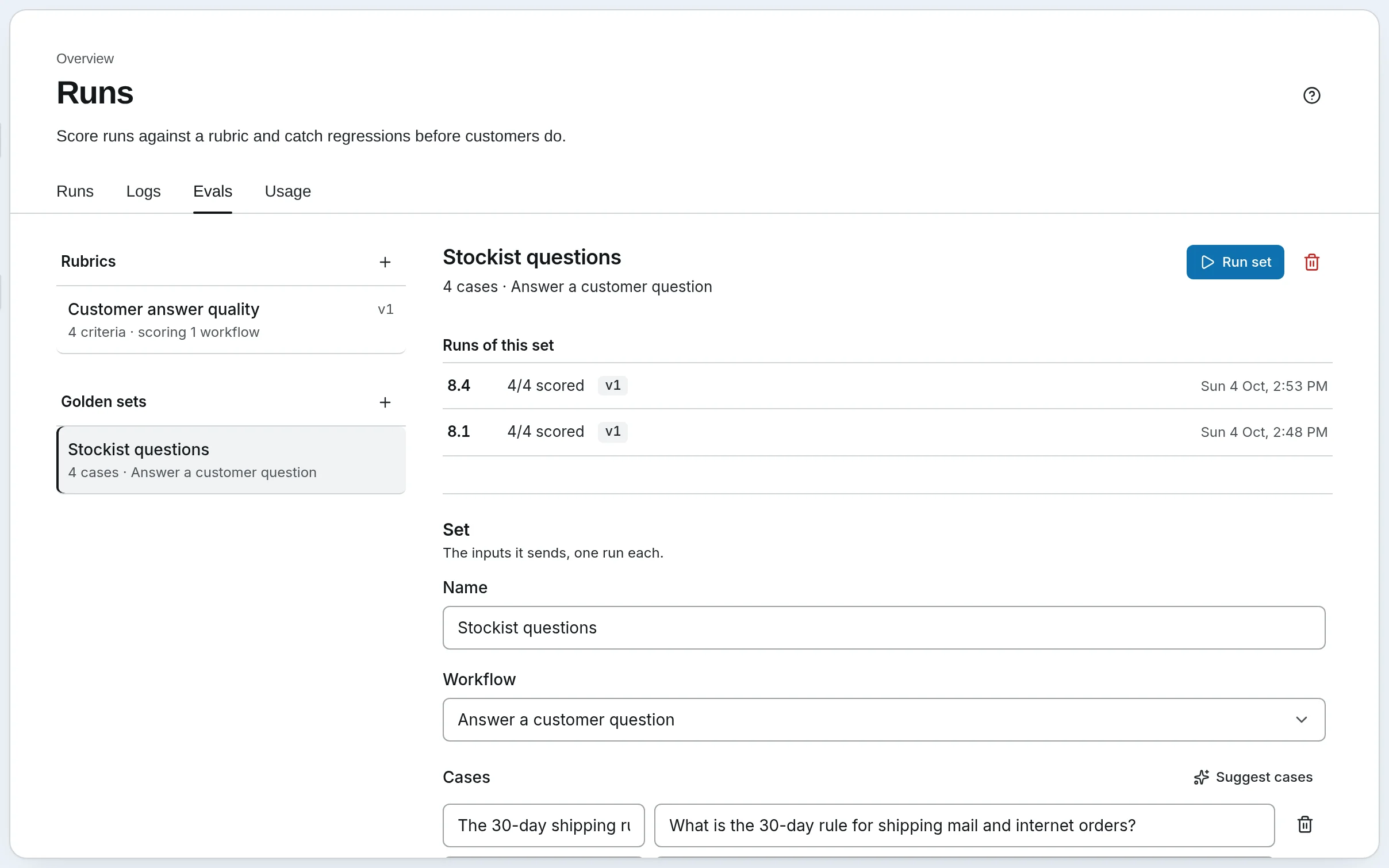
Press + beside Golden sets. Name it — Stockist questions — and pick the Workflow it runs.
Add cases
Press Add case for each one: a short name and the input. Harbor & Pine's four are the questions stockists really ask — What is the 30-day rule for shipping mail and internet orders?, Who should we notify after a data breach?, one about disposing of paper records, one about terms for a new account. Suggest cases proposes some from the workflow itself. Press Save set.
Run it after every change
Changed a prompt, a model or a step? Press Run set. Each case is an ordinary run of the workflow, one after another, scored by its rubric. Runs of this set lists each time it ran with its average — 8.4, 4/4 scored — so you can see whether the change helped.
Each case is billed as a run, plus the judge's call. To check how well a knowledge base finds the answers, rather than how well the workflow writes them, see Evaluate a knowledge base.
Self-hosted
The same page, under Runs › Evals, with a few different words: New set and Run for golden sets. Run says what the set will cost before it starts.
Go further
- Evals — the rubric's fields, what the judge sees, and how the two rules work
Next: make your documents searchable — Knowledge bases.