Search and citations
Follow one question through a knowledge base search — words and meaning, fusion, rerank, the cut — read its trace, narrow it with a filter, and check the citations an answer carries.
When a stockist asks Harbor & Pine's Order desk about the 30-day shipping rule, the agent does not read the FTC's guides. It searches Compliance guides and gets back eight passages, each labelled, and answers from those alone. This guide follows that one search: what happens inside it, how to see it, how to narrow it, and how to check what an answer built on it says.
Every search runs the same way, whoever asks — an agent, a Retrieve step, the API or you. The question is searched twice at once: by its words, stemmed in the base's language, and by its meaning, so a passage that says the same thing in other words is found too. The two lists are fused by rank, a reranker reorders the best of them where one is set, and the cut keeps the top 8. Each passage comes back labelled [K1], [K2]… with its citation: the file, its page or pages, the section heading, and when it was indexed.
Ask it yourself
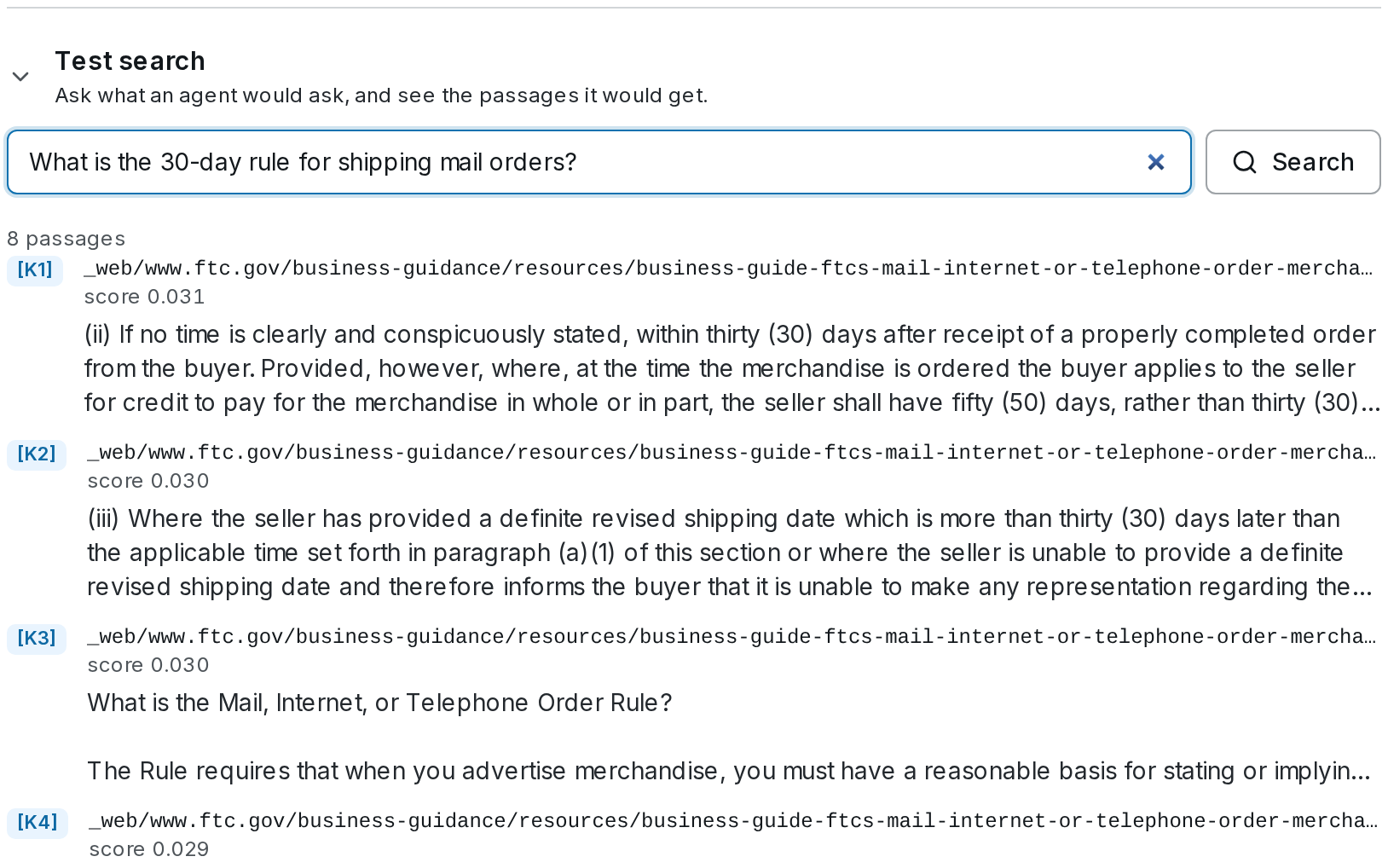
Search the base
Open Knowledge, choose Compliance guides, and under the base's numbers type the stockist's question into Test search — What is the 30-day rule for shipping mail orders? — and press Search.
Read what came back
These are the passages the Order desk would get, in its order: each with its label, file, page and section, its score and its first lines. The FTC's Mail Order Rule guide should be near the top. If the passage you expected is missing or low, that is worth knowing before an agent answers from it.
Open the trace
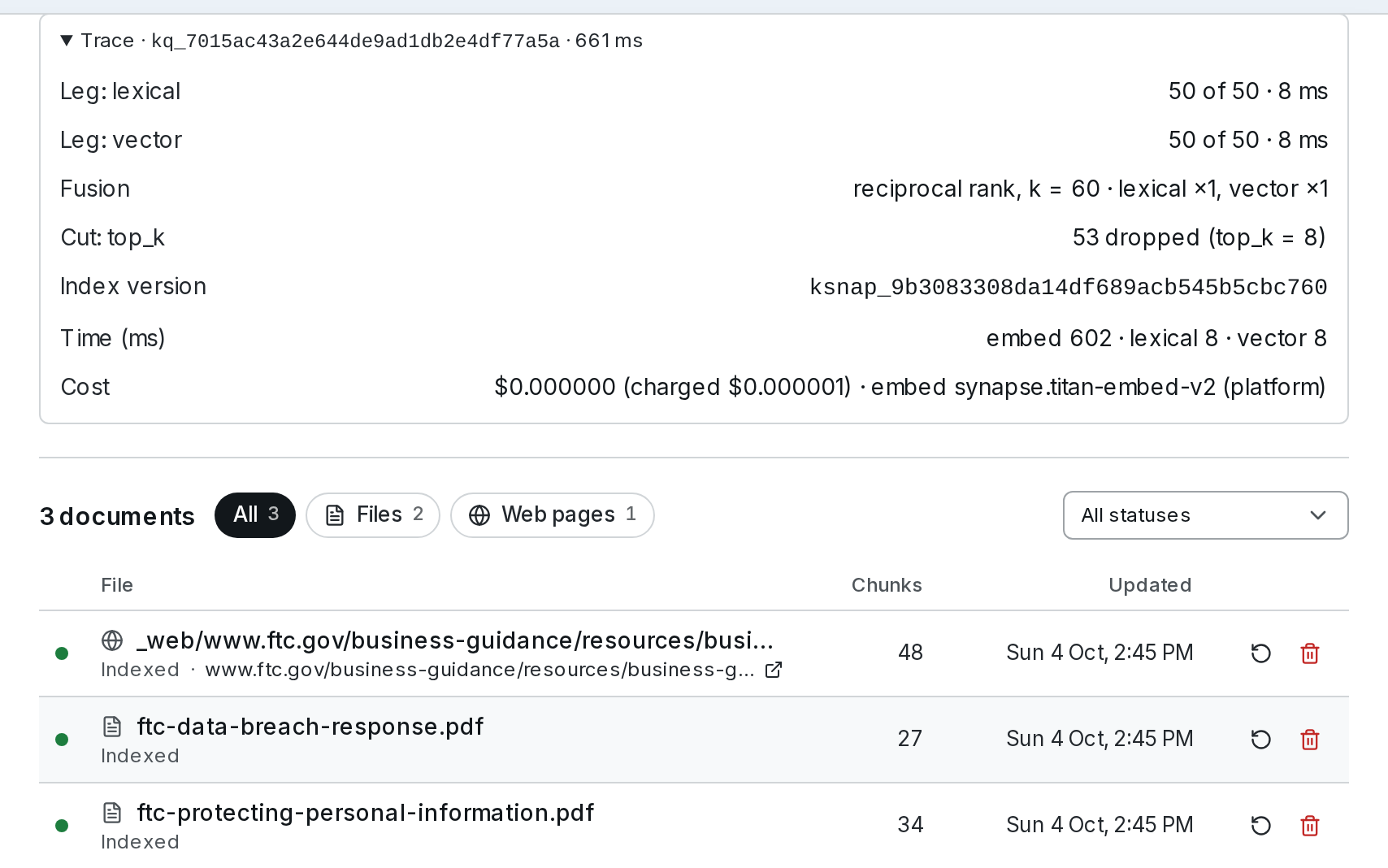
Trace shows how the answer came about. Leg: lexical and Leg: vector say how many passages each search returned of those asked for, and how long it took; Fusion gives each search's weight; Rerank the reranker, when there is one; Cut what was dropped and by which rule; Index version which version of the index answered (ksnap_…); and Time and Cost the rest. A trace is kept for 30 days.
When a search does without something
A search that could not do all of this says so above its passages, and still answers:
| Note | Why | What to do |
|---|---|---|
| Matched by words only: search by meaning needs an embedding model. | The base has no embedding model | Choose one — see Settings and costs |
| The question could not be embedded; words only. | The embedding model failed this time | Check its key or server |
| Reranking failed; results are in search order. | The reranker failed; the fused order stands | Try again, or turn Rerank off for the base |
| This knowledge base hit its monthly budget. | Words only, with nothing charged, until the budget allows | Raise the budget, or wait for the month to turn |
Harbor & Pine's bases rerank nothing, so their traces show no Rerank row and a fused score on each passage.
Narrow it with a filter
A filter limits a search to the documents whose details match — a document's path, source, type, title or date, or metadata of your own. Harbor & Pine's Suppliers & invoices holds suppliers, invoices and policies as records, each with a kind, and invoices with a supplier and a status. To find open invoices only:
curl -X POST https://api.synapseorch.com/api/v1/knowledge/search \
  -H "Authorization: Bearer $SYNAPSE_API_KEY" -H "Content-Type: application/json" \
  -d '{"query": "Which invoices are still unpaid?",
       "kb_ids": ["kb_…"],
       "filters": {"kind": "invoice", "status": {"$in": ["open", "disputed"]}}}'
Each key must match, and a list is spelled $in. The filter runs inside the index, in the same query as the search, so it never leaves you with fewer passages than you asked for. It takes $eq, $ne, $gt, $gte, $lt, $lte, $in, $nin, $exists, $and, $or and $not. An agent filters the same way when it wants to — search_knowledge takes the filter as a JSON string — and a Retrieve step takes one in its Metadata filter.
The answer's hits carry each passage's label, content, score and citation; cost says what the search cost, and degraded names anything it did without — vector_unavailable, rerank_failed or budget_paused, say. See Search and Filters.
Check what an answer cites
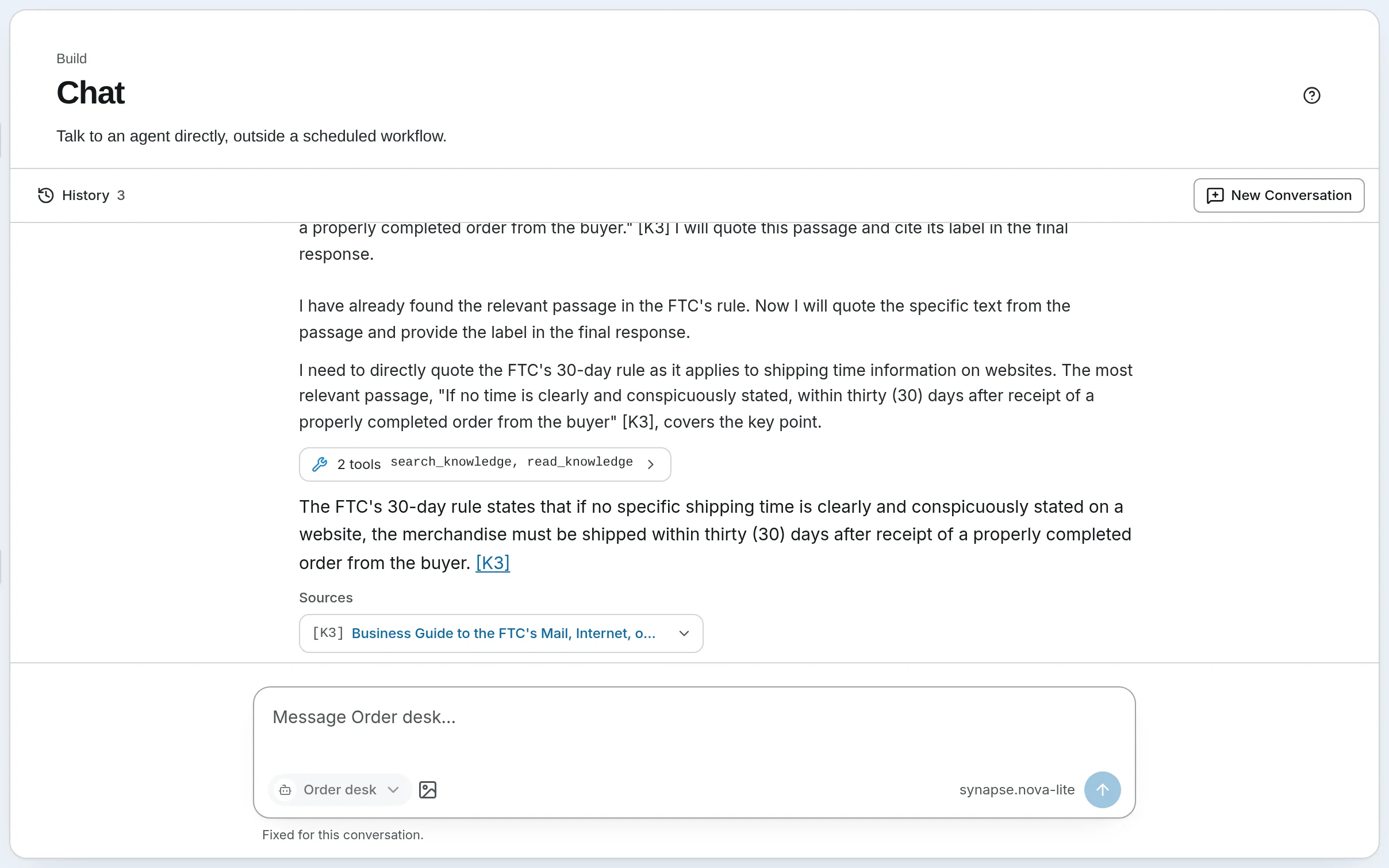
An agent quotes the words it relies on and cites the passage. The Order desk's answer rests on "If no time is clearly and conspicuously stated, within thirty (30) days after receipt of a properly completed order from the buyer" [K3], and Sources names the FTC's Mail Order Rule guide, its section and the page it was fetched from. Labels are fresh for each answer and run on across every search in it, a Team agent's members' included.
Read the Sources
Under the answer, Sources lists each passage it cited: its label, the document's title linked to the file in the Vault or to the web page, the page or pages and section, the first lines, and when it was indexed. Clicking [K3] in the answer jumps to its row. The Sources are saved with the conversation.
Look for amber
Two checks run on every answer, and show in amber under the Sources when they fail:
- The quote check. A quote placed before a label must appear in that passage, word for word or near enough. The words quoted for [K2] are not in this passage means the agent put words in the document's mouth. Quotes under three words are not checked, and the check proves the words are there, not that the claim built on them is true.
- Labels from nowhere. Not from a search in this answer: [K7] lists labels no search in this answer returned.
Read the passage itself
When the answer matters, follow the link to the passage and read it. An answer with no amber is quoted faithfully; whether it drew the right conclusion is still a reader's call.
The same citations come back from the API: the chat API's citations, each with its quote check, and MCP's chat_with_agent. A widget or channel answer carries no labels or Sources, since a chat app cannot show them.
Self-hosted
The same search, trace, filters and checks. A base on the built-in SQLite store stems English only — Simple matches other languages word for word — and a search costs what your providers bill for the question's embedding and any rerank; nothing reranks until you choose a reranker. See Search and Settings.
Go further
- Search and Settings — how a search runs, Test search and its trace, and every setting
- Agents, Chat and Workflows — Sources under an answer, the checks, untrusted content and visitors
- Knowledge API — search, filters and traces from your own code
- Evaluate — measure how often a search finds the answer
Adding documents
Every way into a knowledge base — uploads, web pages, records from your own systems, files a workflow writes — then following each document until it is searchable.
Settings and costs
Tune what a knowledge base returns and how it is indexed, see what a change will cost before you save it, and cap what a base can spend in a month.