Evaluate a knowledge base
Keep a set of questions whose answers you know, measure how often a search finds them, and compare settings and indexes by a number instead of an impression.
Whether a knowledge base finds the right passage is a question with an answer. Evaluate, on a base's page, keeps sets of questions whose answers you know, searches each one, and reports where the answer ranked. A change of settings, of embedding model or of Contextual Retrieval then shows as a score going up or down.
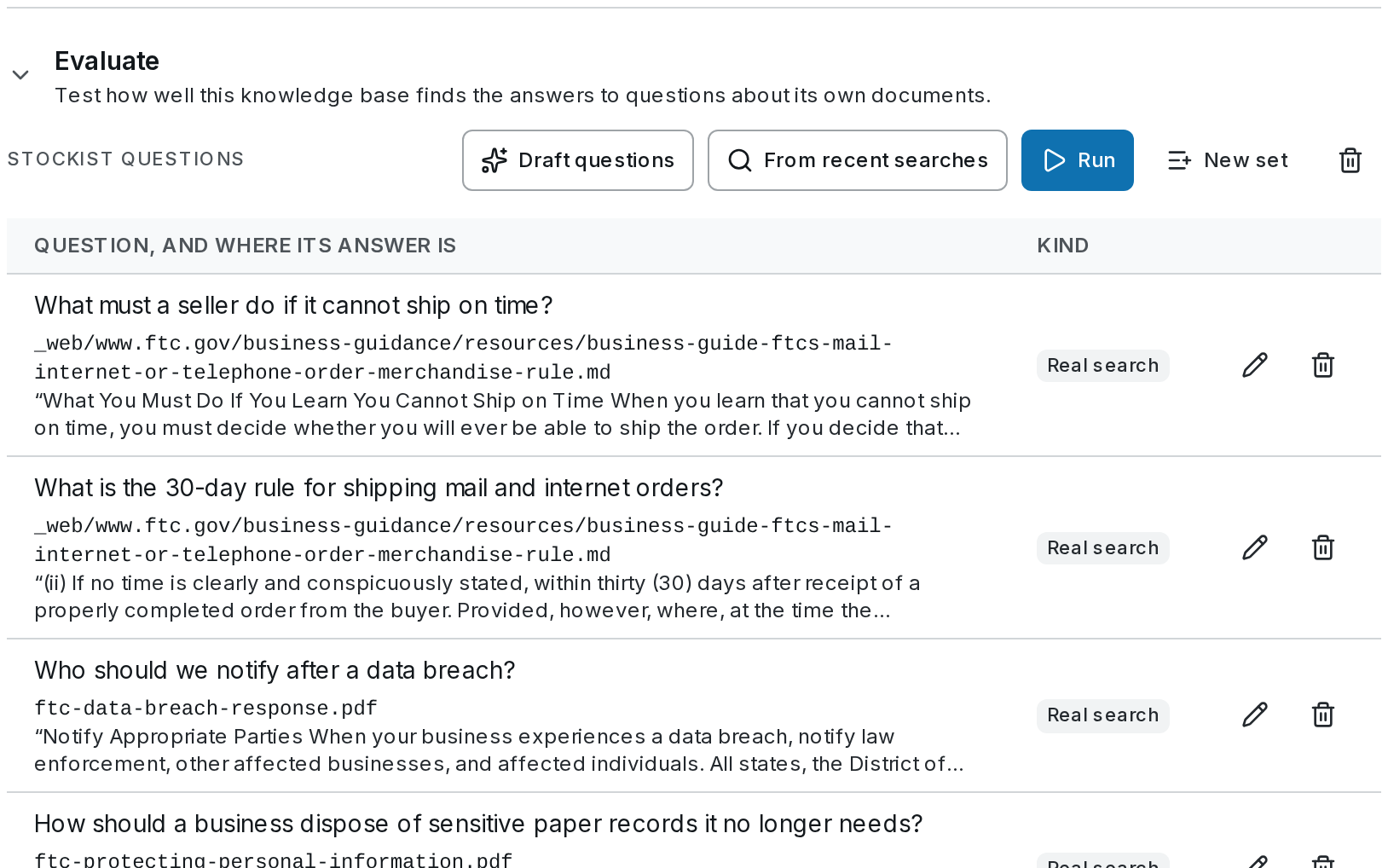
Harbor & Pine keeps a set called Stockist questions on Compliance guides: four questions stockists really ask, each tied to the words in the FTC's guides that answer it. (Its workflow Answer a customer question has an Evals golden set of the same name. That one scores whole runs with a judge; this one scores only whether the search finds the passage.)
Build a question set
A question records where its answer is written — a document and the words in it — not a passage, so it still holds after the base is cut into passages differently. There are two ways to fill a set.
Start a set
Open Knowledge, choose the base, open Evaluate and press New set. Name it after who asks: Harbor & Pine's is Stockist questions.
Add searches people really made
From recent searches lists searches made in the last 30 days — test searches, agents', the API's. Pick one and tick the passages that answer it, up to four. It joins the set as a Real search. Harbor & Pine's four came this way:
- What is the 30-day rule for shipping mail and internet orders?
- What must a seller do if it cannot ship on time?
- Who should we notify after a data breach?
- How should a business dispose of sensitive paper records it no longer needs?
Or let a model draft them
Draft questions has a model write questions from the base's own passages and copy the words that answer each — Direct, Paraphrased (in other words than the passage, the hard case for a keyword search) and Multi-hop (needing two documents). Up to 10 at a time, priced before you draft. They come back as suggestions: Add all, Dismiss all, or Add one at a time.
A set holds up to 200 questions. Expected answer is for the people reading the results; the scores do not use it. If the words a question points at leave the document, it is marked No longer in its document and left out.
Run it
Choose what to compare
Press Run. It searches each question once in each index you pick — the one serving now, one being rebuilt, or one replaced within the week — so a rebuild can be judged against what it replaces before it switches. Rerank is as the base serves searches, or off.
Read the scores
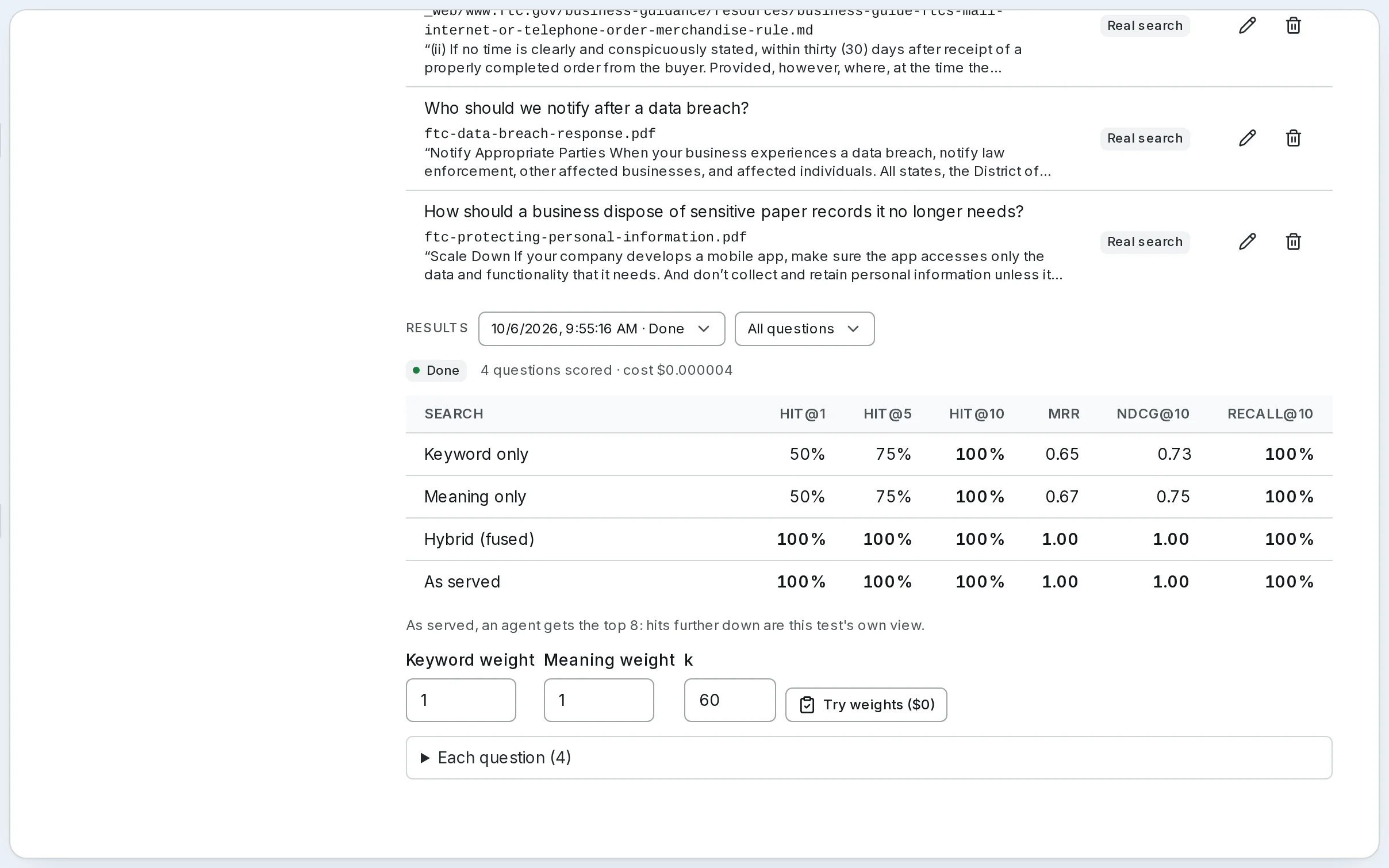
Each search is scored four ways at no extra cost: Keyword only, Meaning only, Hybrid (fused), and As served — what a search really returns. For each:
| Score | Means |
|---|---|
| Hit@1, Hit@5, Hit@10 | The share of questions whose answer is in the top 1, 5 or 10 passages |
| MRR | How high the answer ranks, on average — 1 when it is always first |
| nDCG@10 | The same over the top 10, counting every passage that holds the answer |
| Recall@10 | The share of a question's answer passages found in the top 10 |
The best in each column is bold. Read As served first, with the base's own cut in mind: As served, an agent gets the top 8 — a hit at rank 9 exists, but an agent never sees it.
Open a question
Each question opens to its rank in every ranking, the top passages with the one holding the answer marked, and the search's trace. A question that misses everywhere usually points at the document, not the settings: the answer is in a table that was not read, or in words no one would search for.
Try other weights, for free
Try weights ($0) scores other keyword and meaning weights from the searches already made, without searching again — the quickest way to choose a base's fusion weights.
Grade the answers too
Retrieval scores say whether the passage was found. Tick Grade answers (paid) before a run to ask whether an answer built on those passages says only what they say:
- an answer model answers each question from the passages an agent would get;
- the quote check runs on each answer, free: Quotes found word for word: 14 of 15;
- a judge model, from another model family, scores each answer with the rubric Grounded in cited sources, 0–10.
The run is priced before it starts. The searches count toward the base's monthly budget; drafting and grading are outside it.
Let it watch your changes
A set that has run once runs again by itself, without grading, whenever the base switches to a rebuilt index or a search setting changes — rerank, fusion, the number of passages. Its run is marked after a settings change, and the summary says what moved: hit@5 +7 points since the run before.
On SynapseOrch Cloud everyone in the workspace sees the sets and results, and builders, admins and owners draft, run and edit. A workspace runs as many evaluations at once as its plan runs workflows, counted apart from them; a run has two hours.
Self-hosted
The same sets, runs, scores and grading. The searches cost what your providers bill for embedding the questions; drafting and grading use the models you choose, and are priced before they run. See Evaluate a Knowledge Base.
Go further
- Evaluate a Knowledge Base — question sets, runs, the scores, grading and cost
- Contextual Retrieval — what a question set measured when we turned it on
- Search and Settings — rebuilds and the indexes a run can compare
- Score runs with evals — the other kind: judging whole workflow runs
Settings and costs
Tune what a knowledge base returns and how it is indexed, see what a change will cost before you save it, and cap what a base can spend in a month.
An agent that answers from a knowledge base
Give an agent the knowledge bases it should answer from, steer its searches with descriptions and its prompt, choose between an agent and a Retrieve step, and check that its answers cite what they rely on.