Tools
What an agent can reach — built-in tools, your own HTTP and Python tools, apps you connect over MCP, files in the Vault — and how to add each.
An agent can only do what its tools let it. A tool is a function the model may call, with a name, a description it reads to decide when to call it, and a schema for its arguments. There are four kinds:
| Kind | What it is | Where |
|---|---|---|
| Built-in | Read and write Vault files, run Python, scrape or drive a web page, read a PDF or a spreadsheet, query a database, tell the time | Every workspace has them; see Built-in Tools |
| Your own | An HTTP endpoint, or Python code, that you describe once | Apps › Tools |
| Apps | An app's whole tool set — Asana, GitHub, Notion, and hundreds more — from its MCP server, over the Model Context Protocol | Apps |
| The Vault | Files agents read, and folders that become knowledge bases | Vault |
Whichever kind, you then choose which agents get it: Every tool or Choose specific tools in the agent's editor.
Write a tool of your own
Harbor & Pine's net_terms_due_date works out when an invoice falls due. A model is unreliable at date arithmetic; three lines of Python are not.
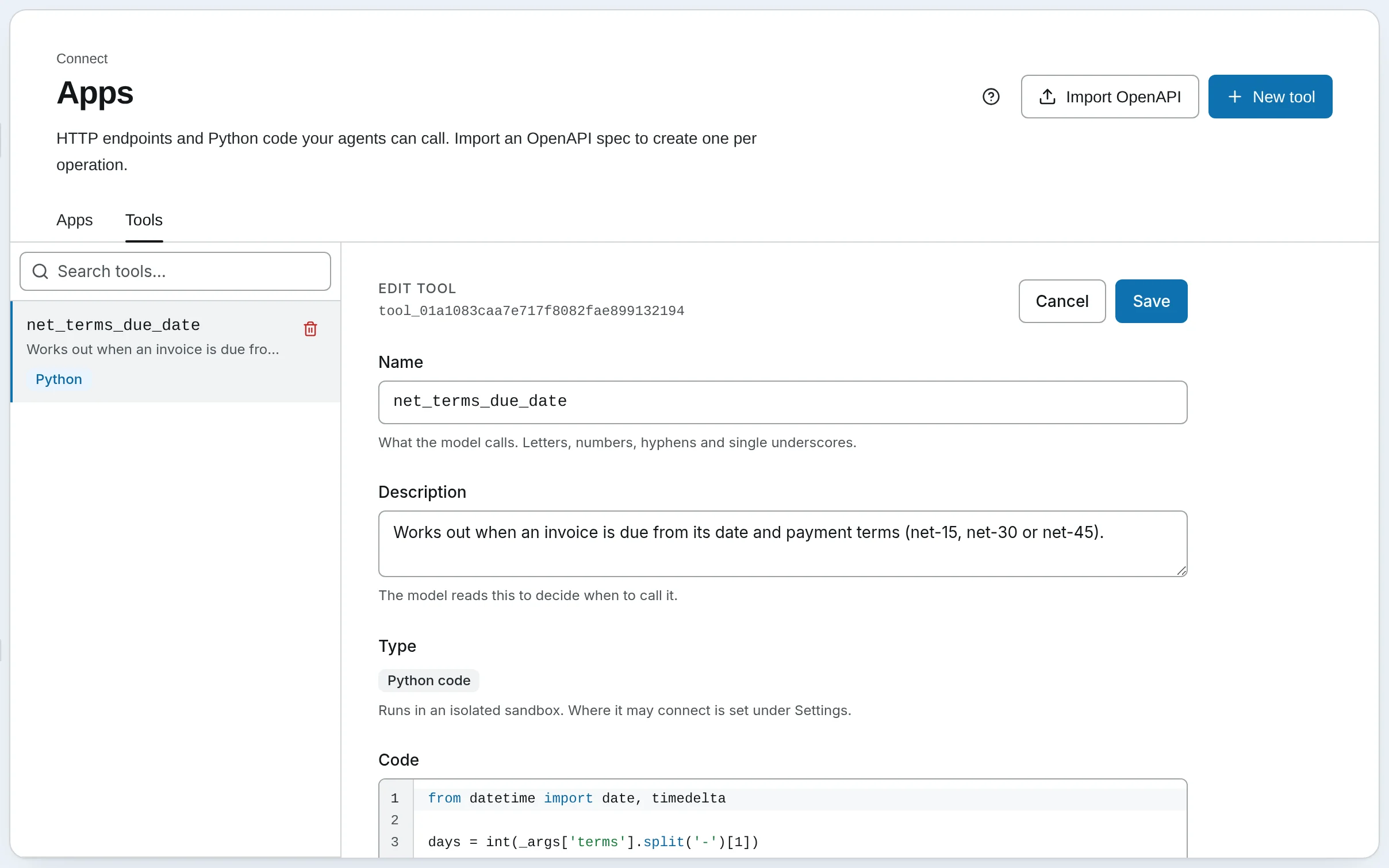
Name it and describe it
Open Apps › Tools, press New tool and choose Python code (or HTTP request, below). The Name is what the model calls, so keep it a plain identifier: net_terms_due_date. The Description is how the model decides when to call it; say what it does and what it needs:
Works out when an invoice is due from its date and payment terms (net-15, net-30 or net-45).
Describe its arguments
Under Input schema, list what the model must pass, as JSON Schema. The descriptions matter: they are all the model knows about each argument.
{
  "type": "object",
  "properties": {
    "invoice_date": { "type": "string", "description": "The invoice date, YYYY-MM-DD" },
    "terms": { "type": "string", "description": "net-15, net-30 or net-45" }
  },
  "required": ["invoice_date", "terms"]
}
Write the code
The arguments arrive as _args, and whatever the code prints is the tool's answer:
from datetime import date, timedelta

days = int(_args['terms'].split('-')[1])
print((date.fromisoformat(_args['invoice_date']) + timedelta(days=days)).isoformat())
The code runs in a sandbox, with the common data packages installed. On SynapseOrch Cloud, Python tools run on the Team and Business plans.
Create it and give it to an agent
Press Create. Then open the agent that should use it — the Invoice clerk — and tick it under Choose specific tools.
An HTTP tool is the same with a method and URL in place of code: the model's arguments fill the URL and body, and Add header carries credentials, stored encrypted. Put a value that several tools share in a variable and write {{ global.key }} where it goes. If the API has an OpenAPI document, Import OpenAPI makes one tool per operation at once. See REST API Tools and Import from OpenAPI.
Connect an app over MCP
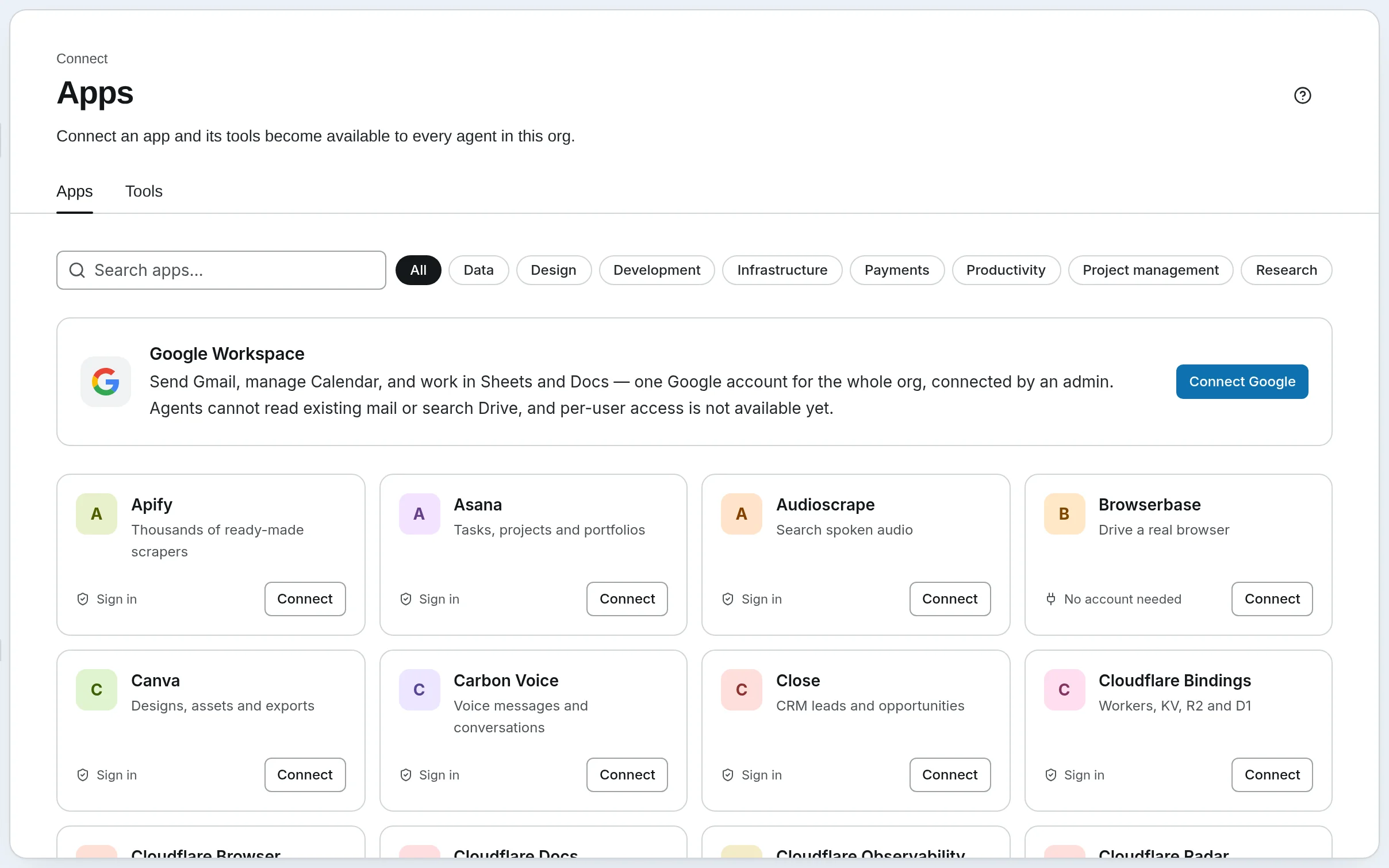
An app brings all its tools at once, from its MCP server. Once its tools are found, every agent in the workspace can be given them.
Pick the app
Open Apps and press Add server to browse the directory, or search it. Each app says what connecting needs: Sign in on the app's own page, or No account needed.
Connect it
Press Connect and finish what the app asks: approve it on its sign-in screen, or paste an access token and press Connect. For a server that is not listed, choose Add another server and enter its name and HTTPS URL.
Check its tools
Select the server to see its status and the tools it offers; Discover tools reads them again after the app changes. Then give the tools to the agents that need them.
Google Workspace has its own button, Connect Google: Gmail, Calendar, Sheets and Docs for every agent, as one Google account an admin connects. See Connecting Google Workspace.
Self-hosted
A self-hosted install connects apps' MCP servers on Apps two ways: Remote (URL), as above, or Local (stdio), a command the machine runs. Presets fill in common servers. See Local Servers and Remote Servers.
Give agents files to read
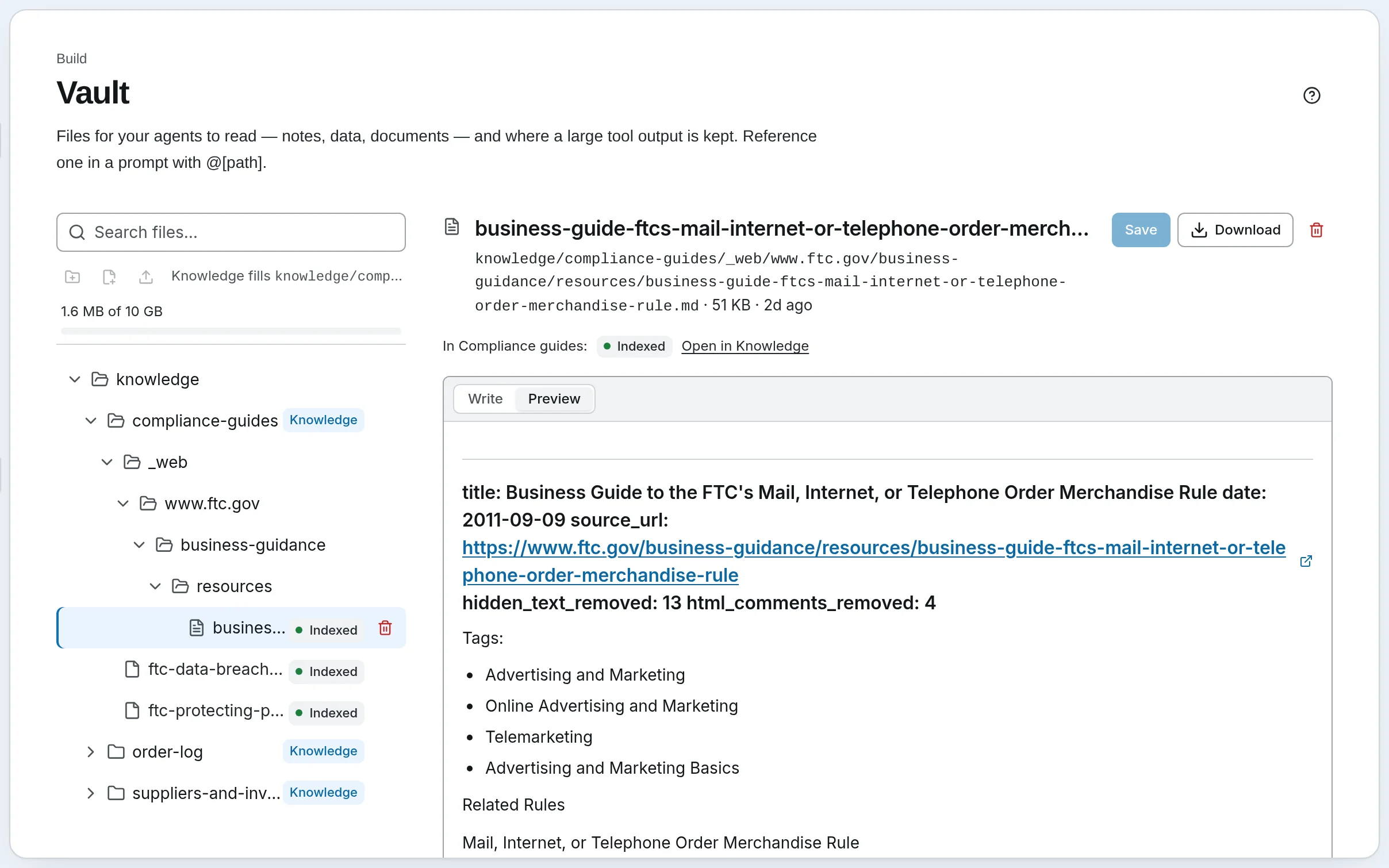
The Vault holds files your agents read: notes, data, documents. Upload files or press New file for Markdown, plain text, JSON or CSV, in folders. Then:
- Put a file in a prompt. Type
@in an agent's system prompt or a step's prompt and pick the file; it goes in as@[path], and its contents are read fresh each time the agent runs. Right for a short file needed on every turn: a price list, a style guide. - Let the agent open files itself. The Vault tools read and write files when the agent decides it needs one.
- Make a folder searchable. A folder with a Knowledge badge is a knowledge base: its documents are indexed, and agents search them for the passages a question needs. Right for many documents, or long ones. See Knowledge bases.
A long tool result is kept in the Vault too, under tool_outputs, so it does not crowd the agent's context.
Go further
- Built-in Tools — every tool every agent can have
- Python Tools — packages, the sandbox, testing
- MCP Servers — what MCP is, and connecting by URL or token
- Tool Policy — tool calls that wait for a person
Next: chat with your agent.
Agents and skills
Make an agent: its model, its instructions and the tools it may use. Then give it a skill, a set of instructions it loads only when a task needs them.
Chat with an agent
Ask an agent something and watch it work: the tools it calls, the passages it cites, and the calls that wait for your yes.