An agent that answers from a knowledge base
Give an agent the knowledge bases it should answer from, steer its searches with descriptions and its prompt, choose between an agent and a Retrieve step, and check that its answers cite what they rely on.
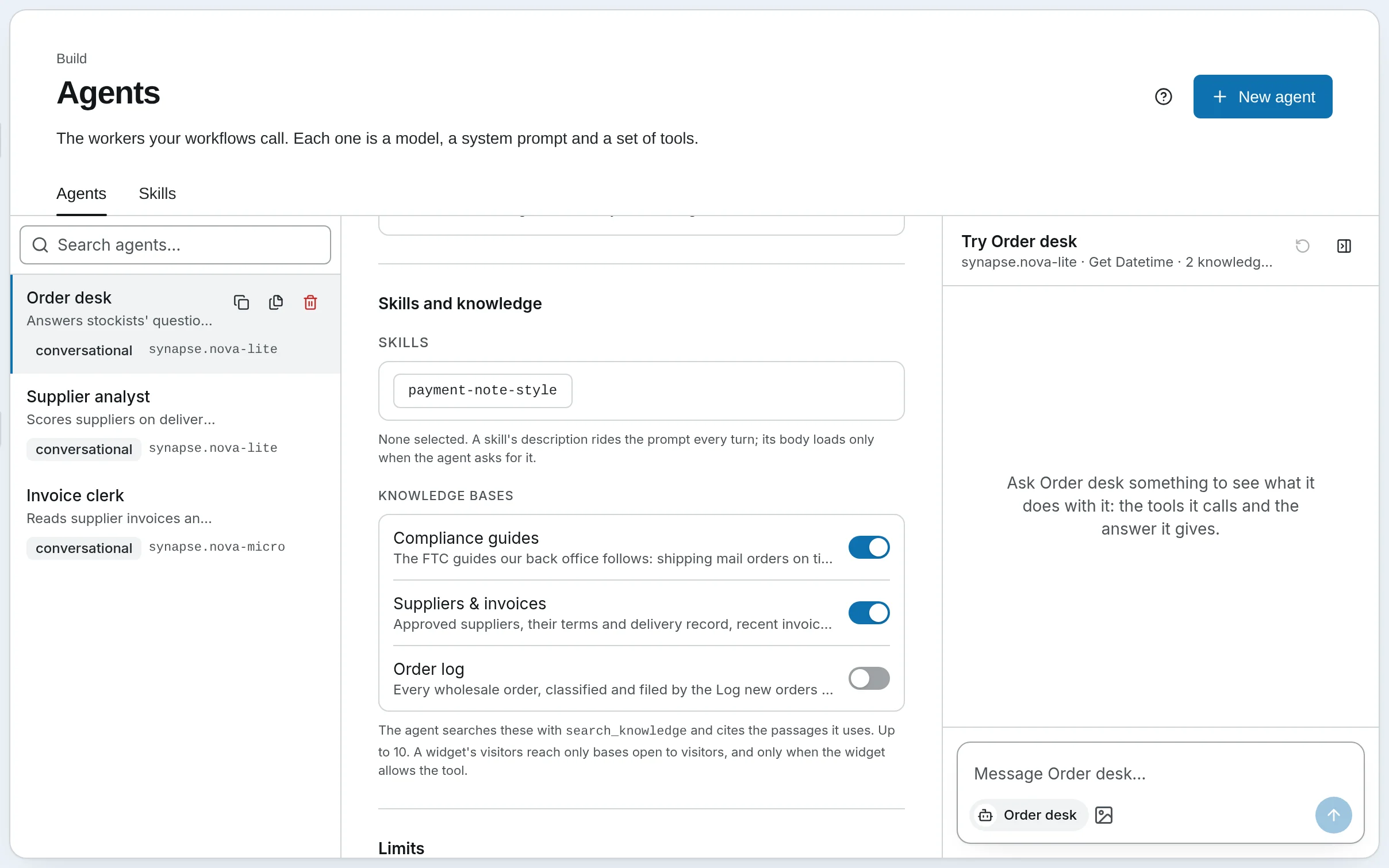
Harbor & Pine's Order desk answers stockists about orders, shipping rules and payment terms. It does not know the FTC's rules or the company's payment policy; it searches for them, in two knowledge bases, and answers from what it finds, citing each passage. This recipe builds that agent, then shows when a workflow should search for itself instead.
1. Describe each base
An agent chooses which base to search by its description: the search tool lists every base the agent has, with its description, so a base's description is worth a sentence about what it holds and when to look there. Harbor & Pine's say:
| Base | Description |
|---|---|
| Compliance guides | The FTC guides our back office follows: shipping mail orders on time, protecting customer data, and what to do after a breach. |
| Suppliers & invoices | Approved suppliers, their terms and delivery record, recent invoices, and our payment policy. |
A question about the 30-day rule goes to the first; one about net-30 terms to the second. A base gets its Description in New knowledge base; to change it later, PATCH the base through the Knowledge API. See Knowledge bases for making one.
2. Give the agent its bases
Tick them
Open Agents, choose Order desk, and under Knowledge bases tick Compliance guides and Suppliers & invoices — up to 10. Save.
Know what it gained
The agent now has two tools, with no other setup:
search_knowledgesearches its bases — all of them, or one by name or id — with a filter on metadata if it wants one, and returns up to 20 passages.read_knowledgereads around a passage it was given, up to three passages either side.
An agent with no bases is offered neither, and its prompt is unchanged.
Choose a model that calls tools well
The agent decides when and what to search, so its model matters. Harbor & Pine's run on Nova Lite: on Nova Micro, the same agents repeated a search they had already made.
3. Write the prompt
Generate prompt, in the same editor, writes instructions that take the ticked bases into account: answer what these collections cover from their passages first, quote the words relied on and cite each passage by its label, and say plainly when the collections do not hold the answer rather than fill the gap. Edit what it writes to fit. The Order desk's own ends:
Answer from the compliance guides and our supplier and policy records, cite the passages you used, and say plainly when they do not cover the question. Keep answers short and practical.
The passages reach the model fenced off as untrusted content — a document that says ignore your instructions is evidence, not an instruction — and a turn that searched asks a person before it saves anything to memory.
4. Ask it
Open Chat, pick Order desk, and ask Who should we notify after a data breach? The tool line above the answer — 2 tools · search_knowledge, read_knowledge — opens to show what it searched for and what came back. Under the answer, Sources lists every passage it cited, linked to the file or web page.
Check the answer the way Search and citations shows: amber under the Sources means a quote that is not in its passage, or a label no search returned. When answers miss, test the same question in the base's Test search: if the passage is not there, no prompt will find it.
5. An agent, or a Retrieve step?
A workflow can search a base two ways, and Harbor & Pine's Weekly supplier review uses both, side by side:
| An Agent step (Supplier scorecard) | A Retrieve step (Find open issues) | |
|---|---|---|
| Searches | When and as often as the agent decides, with queries it writes | Once, with a query built from state |
| Reads more | Yes, with read_knowledge | No: the passages it found |
| Model calls | One per turn, up to Max turns | None |
| Predictable | Less: it may search twice, or not at all | Exactly the same each run |
| On SynapseOrch Cloud | 1 credit, plus the agent's model and searches | 0.1 credit, plus the search |
Use an agent when the question decides what to look up; use a Retrieve step, then an LLM step, when every run needs the same passages — see Retrieve, then write. An Agent step runs on the agent's own model with its bases; its Max turns defaults to 15, and Harbor & Pine's scorecard keeps it at 6.
6. Let visitors ask it
The same agent can answer on your site. A widget's visitors search a base only when the base's Visitors may search it is on and search_knowledge is ticked under the widget's What visitors can use; their answers come without [K#] labels or Sources. Harbor & Pine lets visitors search Compliance guides, which is public, and never Suppliers & invoices. See A support bot on your site.
Self-hosted
The same editor, tools, prompt writer and checks, once Knowledge is on in Settings → General. The agent's model is one of yours — any model that calls tools works; a small local model may search less well.
Go further
- Agents, Chat and Workflows — the two tools, Sources, the checks, untrusted content and visitors
- Creating agents — the editor, tool policy and the AI prompt writer
- Step types → Agent — an agent inside a workflow
- Chat API — the same answers and citations from your own code
Evaluate a knowledge base
Keep a set of questions whose answers you know, measure how often a search finds them, and compare settings and indexes by a number instead of an impression.
Retrieve, then write
Search a knowledge base inside a workflow with a Retrieve step, hand the passages to an LLM step that writes from them, narrow the search with a filter, pin it to one version of the index, and read the run.